


.avif)





.svg)




SVG-Edit is positioned as an open-source SVG editor, directly accessible via the browser, offering a lightweight, instant alternative to the design behemoths. But, in 2025, with the constant evolution of tools and professional expectations, is it still a relevant solution for your day-to-day visual creations? I've watched Easy Web grow since 2020, and believe me, I've tested dozens of tools. Simplicity, features, limitations... After years of using SVG-Edit for certain tasks, here I share my unfiltered feedback and my objective opinion on its real usefulness depending on your needs.

My experience with SVG-Edit
Believe it or not, SVG-Edit has been part of my toolbox at Easy Web for years now. It's always been there for those quick little tweaks or when I wanted to test a vector idea without pulling out the heavy artillery. What I've always loved about it is its lightness and direct accessibility from the browser.
When you need to edit an SVG on the fly, make a minor correction to an icon, or create a simple graphic element without installing any software, SVG-Edit is unbeatable. For rapid prototyping, or for inline CSS modifications to existing SVGs, its web-based nature makes it incredibly handy.
Now, let's make no mistake. It will never replace Illustrator or Affinity Designer for complex projects. As soon as you tackle detailed illustration, advanced layer management or pro features, you quickly reach its limits. It's a niche tool, not a Swiss Army knife.
Is SVG-Edit really useful for my needs?
The real question before SVG-Edit? Your purpose. Its relevance depends on usage. To quickly modify an existing SVG, adjust an icon or light illustration without launching heavy software, SVG-Edit is an immediate, devilishly effective solution. That's where it shines.
Front-end developer, integrator, or designer managing assets? SVG-Edit becomes your ally. Change the color of a logo, resize for responsive, optimize a frictionless SVG: for these micro-interventions, it saves you precious time. I've been there.
And its other trump card? Entirely browser-based. No installation, no licensing. It's the freedom to act anywhere, anytime. I appreciate this flexibility for urgent, no-holds-barred retouching.

Is SVG-Edit suitable for beginners?
If you're taking your first steps into vector design, SVG-Edit is, in my experience, an excellent gateway. It's a simple tool, accessible directly from your browser, ideal for understanding the basics without being overwhelmed. You can create geometric shapes, manipulate text or draw simple paths, perfect for minimalist icons or basic web illustrations. It's a real sandbox for familiarizing yourself with the key concepts of SVG.
Its uncluttered interface, with no installation required, makes it easy to get to grips with immediately, a major advantage for juniors or those wanting to prototype quickly without investing in complex software. It also provides a concrete grasp of how SVG code is structured, a valuable skill for any web professional. It's clearly the perfect tool for rapid iterations and a first concrete approach to the vector format.
How much does SVG-Edit cost?
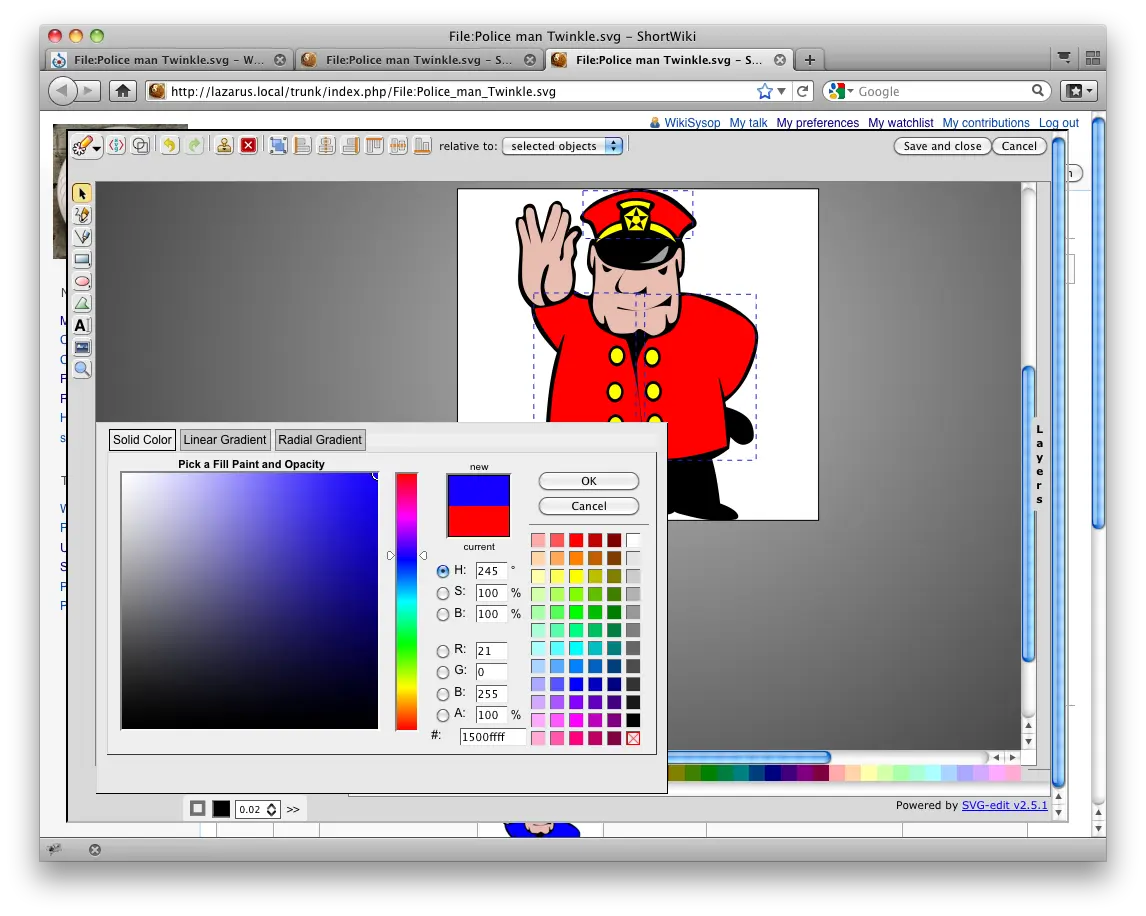
Let's talk money. That's often the first question, isn't it? For SVG-Edit, the answer is simple and straightforward: zero. Yes, you read that right. It's a completely open-source tool, which means you can download and use it freely, without any licenses, subscriptions or hidden costs.
For a freelance designer or small studio that needs occasional SVG editing, it's a free "package" with virtually no investment cost, beyond the time it takes to discover it. For us web agencies looking to integrate it deeply into our workflows or customize it for complex customer projects, the "formula" is one of technical investment: development time and expertise. It's not a recurring expense, but a one-off investment for unrivalled flexibility and control. That's the beauty of "free" in the pro world.
What are the key features of SVG-Edit?
What sets SVG-Edit apart is its purely browser-based nature. Forget tedious installations and licenses to manage: you launch the tool directly from your browser. This is a colossal advantage for our agency workflows, where responsiveness is king. No matter where the team is located, a designer can work on an SVG visual in the blink of an eye, without worrying about software configurations. An agility that clearly simplifies daily life.
Beyond the visual interface, SVG-Edit shines in its ability to allow direct editing of SVG code. With one click, you can switch to the underlying XML view. For demanding designers and developers, this is an invaluable control. You can fine-tune precise details, optimize the file or correct subtleties that the graphical interface doesn't always offer. For truly impeccable web integration and optimized rendering, this feature is for me indispensable.
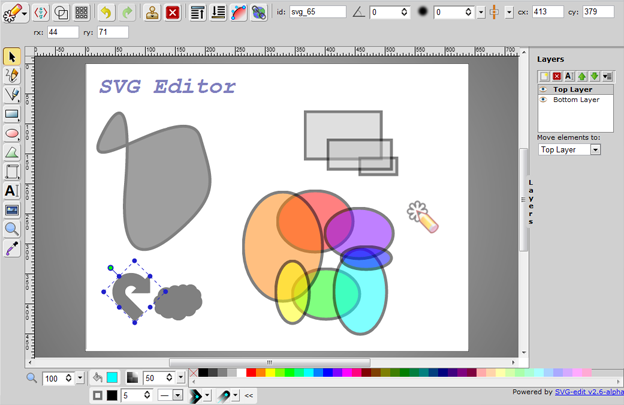
We're not going to lie, layer management is the lifeblood of your designs when they start to get big. SVG-Edit understands this perfectly and offers a robust layer system. You can organize your elements, lock them, make them invisible, and above all, group them together to manipulate entire blocks of your illustration without the risk of disorganizing everything. This is fundamental for non-destructive design and for maintaining impeccable clarity, especially on complex projects.
And for code purists, those who want absolute control, SVG-Edit integrates a raw XML/SVG code editor. This is a feature I particularly appreciate, as it allows you to directly modify SVG attributes, paths or nodes. Need to optimize the file down to the pixel, or inject a specific line of code for an interaction? That's where it's at. Clearly not for beginners, but indispensable for advanced workflows.
If you're looking for a tool for simple icon projects or quick adjustments, SVG-Edit is often the first reflex, that's nickel. But for complex vector illustrations, sophisticated gradients, or the integration of interactive JavaScript scripts directly into your SVG, it quickly reaches its limits. Its layer management is basic, and real-time collaborative working is non-existent. It quickly puts the brakes on your professional ambitions.
For these challenges, behemoths like Adobe Illustrator or Affinity Designer prevail, offering unrivalled power and precision for vector-based design. Figma, on the other hand, shines for fluid collaboration. SVG-Edit isn't here to compete with them; rather, it's positioned as a fast, accessible solution, ideal for troubleshooting or light tasks, with no subscription required. It has its place, believe me.
Here's a quick review:
SVG-Edit highlights:
- Free and open-source.
- Lightweight, works directly in the browser.
- Excellent for quick modifications and creations.
VSG-Edit weak points:
- Advanced features limited for pros.
- No integrated collaborative features.
- Less modern and intuitive user interface for large-scale projects.
FAQS
Is it reliable and secure?
Absolutely. As an open-source tool, its code is transparent and auditable by the community, which reinforces reliability and enables rapid identification of potential vulnerabilities. This is an important guarantee of security. Since it's a client-side application, running directly in your browser, the risks associated with processing data on a third-party server are virtually non-existent. Your work stays on your machine. For reliability, it's stable and has proven itself over the years for editing complex SVGs, even in 2025.
Is it compatible with my other tools?
Absolutely. SVG-Edit's strength lies in its native handling of the SVG (Scalable Vector Graphics) format, an open web standard. This means that the files you create are directly compatible with most web browsers, modern front-end frameworks and, crucially, other vector design software such as Illustrator or Figma. You can import and export your creations with ease, ensuring seamless integration into your workflow. This is a major advantage for agencies.
Is there responsive customer support?
Since we're talking about an open-source project like SVG-Edit, there's no "classic" customer support with a phone number or live chat. You'll find help mainly via the community: dedicated forums, GitHub repositories for reporting bugs or consulting existing "issues" (reported problems). Its responsiveness will therefore depend on volunteer contributors and project activity. It's not the same model as commercial software with a dedicated team. You need to be ready to consult the documentation and exchanges.
What do other users think?
Feedback is mixed. Many appreciate SVG-Edit for its open-source nature and direct accessibility via browser. This is an asset for quick modifications or simple adjustments to SVG files, without installing heavy software. On the other hand, more demanding designers and agencies often point to a dated interface and a lack of advanced features. This limits its use for complex creations or large-scale production. It's a good complementary tool, not a complete replacement.
Can I easily change later?
Feedback is mixed. Many appreciate SVG-Edit for its open-source nature and direct accessibility via browser. This is an asset for quick modifications or simple adjustments to SVG files, without installing heavy software. On the other hand, more demanding designers and agencies often point to a dated interface and a lack of advanced features. This limits its use for complex creations or large-scale production. It's a good complementary tool, not a complete replacement.
Alternatives
.svg)

Specializing in business creation, sales and digital marketing, he puts his expertise at the service of users to help them identify the solutions best suited to their needs. Passionate about digital innovation and optimizing online performance, Alexis is committed to providing detailed, transparent and unbiased comparisons.
Do you have an entrepreneurial project?
We support you in the structuring and development of your tech project. Make an appointment with one of our Business Strategists.