


.avif)





.svg)
.svg)



Should OpenRPA be used in 2025?

OpenRPA stands out as a business process automation solution for professionals looking to optimize their repetitive tasks and gain in efficiency. Designed for a wide audience ranging from SMEs to large enterprises, this open source tool offers a powerful platform for automating a variety of processes without requiring in-depth programming skills.
In a context where productivity is a major issue, OpenRPA begs the question: how can you intelligently automate your workflows with a flexible, accessible tool? This article offers a detailed exploration of OpenRPA's features, benefits, costs and limitations to help you decide whether this solution is right for your automation needs.
My experience with OpenRPA
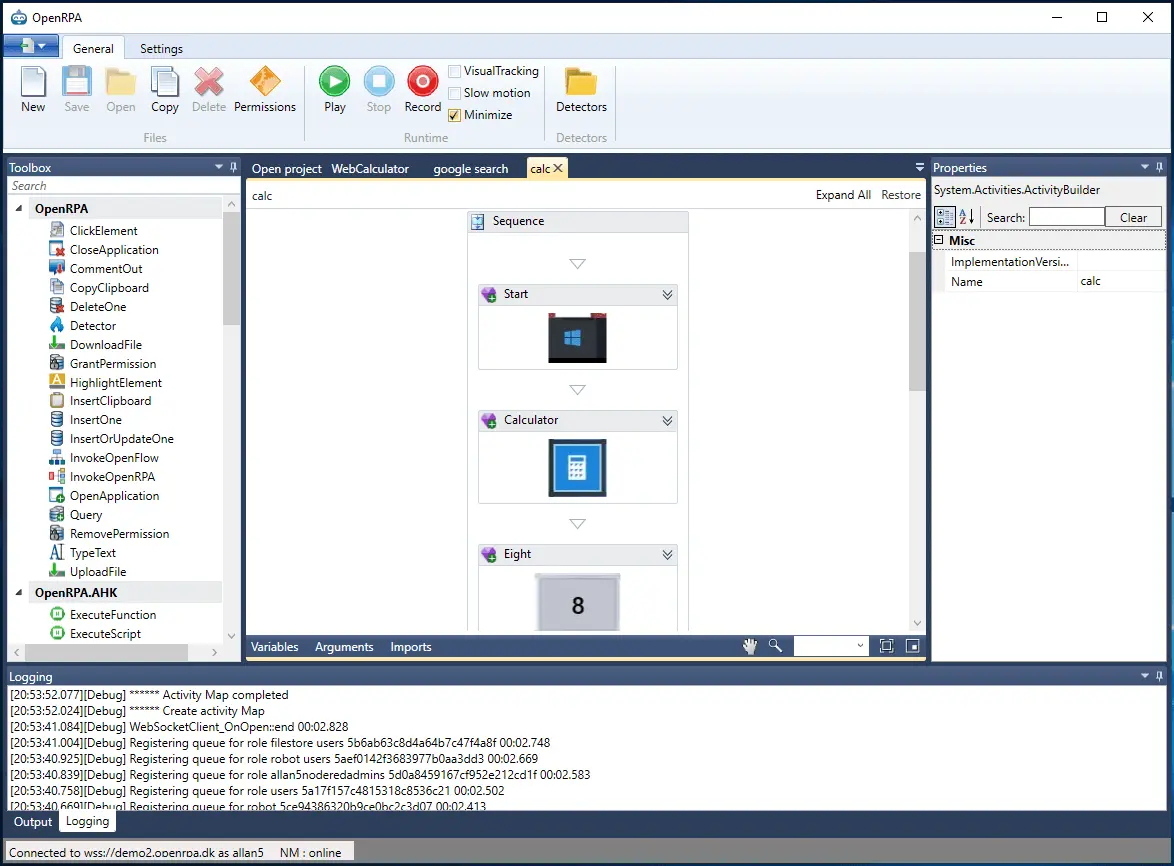
I've used OpenRPA mainly in a professional context to automate several administrative and repetitive processes within a digital marketing team. What I particularly appreciated was its open source nature combined with an intuitive visual interface, making it easy to create complex workflows without necessarily coding. The tool stands out for its great flexibility thanks to support for multiple protocols and integrations.
OpenRPA excels in particular at automating tasks involving data processing, automated emailing, or document management. It proves particularly useful for synchronizing disparate applications via APIs or graphical interfaces, thus considerably reducing the time spent on repetitive tasks.
The main limitations I've encountered concern the learning curve, which can be a little steep for complete beginners, as well as some difficulties when integrating with some very specific software. However, its active community and multiple online resources make it much easier to overcome these obstacles.
Is OpenRPA really useful for my needs?
The real question to ask yourself before adopting OpenRPA is whether you actually have repetitive, structured processes that can benefit from automation. If you manage a multitude of manual tasks that consume too much time, this software could bring you considerable productivity gains.
Many profiles can benefit from OpenRPA:
- Marketing agencies that need to automate the collection and processing of customer data.
- Support teams wishing to automate the sending of standard responses or ticket management.
- Video and multimedia production studios that process large volumes of files and could automate sorting or transfers.
In addition, OpenRPA offers extensive customization to adapt to specific business requirements, and its open source nature allows for continuous evolution according to your specific needs.


Is OpenRPA suitable for beginners?
OpenRPA offers a visual interface that makes workflows easy to understand, which is a plus for automation beginners. Novice users can thus create simple scenarios without requiring advanced coding skills. However, familiarity with flow logic and a few technical notions will greatly enhance the user experience.
For beginners, OpenRPA offers tutorials, an active community and forums that are valuable resources for getting started efficiently. The tool helps to quickly automate simple tasks, while leaving the door open to more advanced configurations as skills grow.
How much does OpenRPA cost?

OpenRPA is a completely free, open source solution, making it a particularly attractive choice for small businesses or freelancers wishing to get started with automation without a large initial investment. No subscription is required to access the complete platform.
This free-of-charge status means that automation can be freely experimented with and projects deployed without any direct budget constraints. However, users who require professional support or additional functionality may consider third-party add-on services, usually for a fee, offered by the community or specialized integrators.
What are OpenRPA's key features?
OpenRPA's key functionality lies in its ability to automate tasks through an intuitive visual interface, enabling processes to be modeled without complex code. This low-code approach facilitates the creation of software robots capable of interacting with various systems and applications, notably via click simulation or the manipulation of graphical elements.
Another key strength is the extensive support for integration protocols and APIs, offering compatibility with a wide range of business tools. This makes it easy to link OpenRPA to ERP systems, databases, or cloud services, increasing the power of automation.

Among its advanced features, OpenRPA offers an orchestrator that centralizes robot management and task scheduling, ensuring optimal control of automated processes.
Furthermore, the tool enables easy integration with OpenFlow, a complementary open source workflow engine, which adds advanced business process management (BPM) capabilities. These integrations pave the way for complex automation scenarios suitable for companies of all sizes.
OpenRPA is a robust solution, but it also has certain limitations depending on the use case. For very specific or complex needs, getting to grips with it can take a considerable amount of time, especially for those unfamiliar with automation or RPA (Robotic Process Automation) concepts.
Compared with tools such as UiPath or Automation Anywhere, which offer complete turnkey suites with extensive commercial support, OpenRPA may require more effort in terms of set-up. Nevertheless, its open source model brings valuable freedom that proprietary solutions don't always allow.
In summary, its advantages include flexibility, free availability and adaptability, while its disadvantages concern the learning curve and the sometimes perfectible interface for novice users.
FAQS
Is it reliable and secure?
OpenRPA is designed with security and reliability in mind. The tool uses secure standard protocols for communications and data exchanges, notably through encrypted connections. The open source nature of the project also ensures total transparency over the code, enabling the community and auditors to verify the absence of major flaws.
In terms of robustness, OpenRPA offers error recovery and exception handling mechanisms to guarantee process continuity. However, as with any RPA solution, it is advisable to adopt rigorous governance and regularly update the tool to ensure an optimal level of security.
Is it compatible with my other tools?
OpenRPA supports a wide range of integrations and formats, making it adaptable to diverse IT environments. It is compatible with Windows and Linux, and handles interactions with desktop, web and cloud applications.
Possible integrations include REST APIs, SQL databases, cloud services such as Microsoft Azure, as well as third-party applications often used in business. This facilitates its adoption in existing infrastructures without the need for major redesign.
Is there responsive customer support?
Official OpenRPA customer support relies primarily on an active community and dedicated forums. Here, users can ask questions and find solutions shared by other members.
For companies seeking more formal assistance, there are third-party providers offering paid support, including personalized advice and training. Generally, response times via community channels are variable, but the wealth of online resources compensates for this expectation.
What do other users think?
User reviews of OpenRPA are generally positive, praising in particular the tool's flexibility and free availability, which make it an accessible solution for different professional profiles.
Frequently cited negative points include the initial complexity for novice users and the lack of direct customer support included in the free version. Nevertheless, the strong involvement of the community helps to overcome these obstacles.
Can I easily change later?
User reviews of OpenRPA are generally positive, praising in particular the tool's flexibility and free availability, which make it an accessible solution for different professional profiles.
Frequently cited negative points include the initial complexity for novice users and the lack of direct customer support included in the free version. Nevertheless, the strong involvement of the community helps to overcome these obstacles.
Alternatives
.svg)

Specializing in business creation, sales and digital marketing, he puts his expertise at the service of users to help them identify the solutions best suited to their needs. Passionate about digital innovation and optimizing online performance, Alexis is committed to providing detailed, transparent and unbiased comparisons.
Do you have an entrepreneurial project?
We support you in the structuring and development of your tech project. Make an appointment with one of our Business Strategists.