


.avif)





.svg)



Should you be using Gravit Designer in 2025?

Gravit Designer has always tried to position itself as a solid and often free alternative to the giants of graphic design, a bit like the little thumb challenging the giants. But in 2025, as the market for tools continues to evolve, is Gravit Designer still relevant for our visual creations, especially in agencies? I've been using Gravit Designer since the early days of Easy Web, and I'd like to share my experience with you. Together, we'll dissect its simplicity, key features and real limitations, so that you can judge whether it fits your needs today.

My experience with Gravit Designer
Gravit Designer has been with me for several years now, and I've watched it grow and refine. For me, its undeniable strength is its multiplatform flexibility and power in vector design.
It excels at creating logos, icons or even early UI/UX mockups. Being able to work indifferently on desktop or via a simple browser is a major asset for our teams in hybrid mode. It's ideal for quickly turning a vector-based idea into reality.
That said, for large-scale projects requiring advanced prototyping features or complex, large-scale collaboration, it shows its limitations. It can't yet compete with dedicated tools on these precise aspects.
If you're looking for a new way of working, you've come to the right place.
Is Gravit Designer really useful for my needs?
The real question to ask yourself before using Gravit Designer is: what is my objective? Because the relevance of Gravit Designer depends very much on how you use it. For light vector illustrations, icons or simple UI prototypes, without the heaviness of pro suites, Gravit Designer is a solid and relevant option.
Whether you're a freelance developer mocking up UIs, a content creator for your infographics, or even a small agency prototyping icons: Gravit Designer proves effective. It offers the agility and autonomy needed when speed is of the essence, without the complexity of behemoth tools.
It's cloud-based, cross-platform operation is a major asset. No more cumbersome installations: you can access your projects from anywhere, on any OS. This flexibility is the 2025 requirement for any dynamic team.

Is Gravit Designer suitable for beginners?
For those taking their first steps into graphic design, Gravit Designer is an excellent surprise. Its uncluttered, intuitive interface puts you at ease immediately, far from the usual complexity of some software. You'll quickly get the hang of it for simple tasks: creating visuals for social networks, basic logos or web page mock-ups. It's an ideal playground for getting started with vector graphics without feeling overwhelmed.
Another strong point for novices is that it's entirely cloud-based. No complex installation, you access your projects from any browser, on any device. It's total freedom to experiment and learn the basics of vector design, a key skill, without spending a single euro at the outset. It's a great opportunity to get started without the brakes.
How much does Gravit Designer cost?

Let's talk money, because it's crucial. Gravit Designer offers a Pro package, and I have to say it's worth a look. For around €49 a year, you unlock the tool's full potential. No more limits, you get access to offline mode - a real plus when working on the move or without a stable connection - an almost unlimited version history, and exports in every conceivable format. Who is it for? Clearly for agencies, established freelancers managing complex projects, or those who need a complete suite but don't want to invest in the market behemoths. It's a smart investment for uncompromising productivity.
What are the key features of Gravit Designer?
When I started to really explore Gravit Designer for the team, what struck me right away was its multiplatform and cloud nature. It's a real asset for us. You don't have to worry about what operating system you're using - Windows, macOS, Linux, or even Chrome OS, everything runs directly in your browser. This makes teamwork and access to projects much simpler, no matter where you are, without complex installation. No more versioning problems between collaborators!
Next, let's talk about its hardcore vector design tools. For a tool with such a generous free version, the suite is surprisingly comprehensive. You'll find everything you need to create icons, illustrations or web mock-ups: precise shape tools, Bézier paths, Boolean operations, and intuitive layer management. It's quick and easy to get to grips with, even for those coming from other software packages. It's ideal for prototyping fast and well.
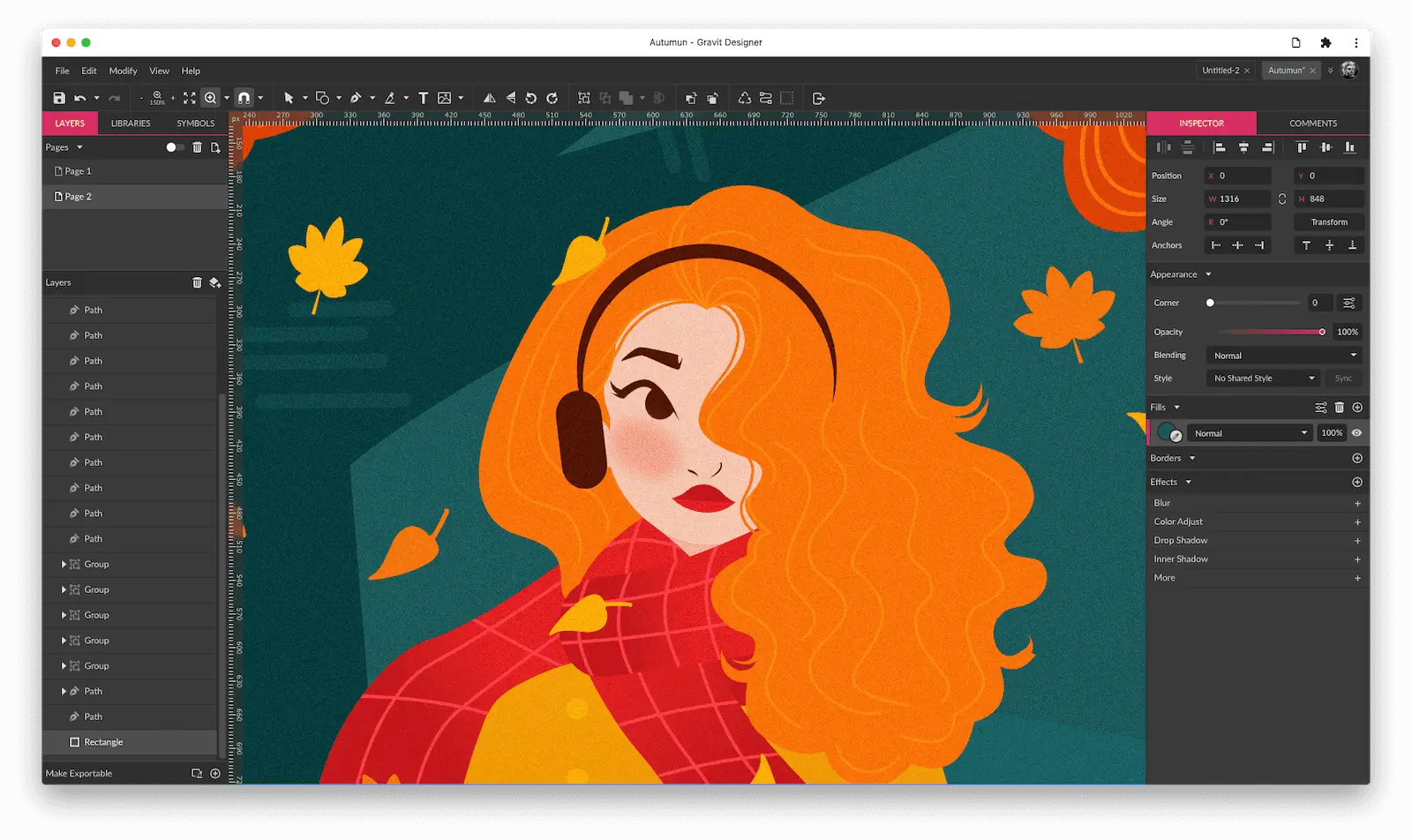
The first thing that strikes me about Gravit Designer is its natively web-based collaborative power. We tested this at Easy Web: no need to exchange heavy files. Working on the same project in real time, seeing everyone's modifications, speeds up the feedback process. For an agency, it's a huge time-saver, believe me. You can literally have several people working on the same model without stepping on each other's toes, it's a real game-changer.
Then, the vector manipulation capabilities are really advanced. I particularly appreciate the handling of complex shapes and the non-destruction of edits. This means that if you modify an element, you can always go back or fine-tune without breaking everything. And the "Components" (or symbols) are super useful for maintaining visual consistency on large projects, a must for our design systems.
Despite its strengths, Gravit Designer has its limitations. For complex UI/UX projects with lots of screens or dynamic components, its lack of advanced features like auto-layout or advanced prototyping makes itself felt. It's less intuitive for an agency managing dozens of customer iterations on a daily basis.
For these scenarios, Figma or Adobe XD remain the undisputed champions. But Gravit is not to be discarded! It excels for simpler vector graphics, icons or static web visuals. It's an excellent starting point, lightweight and cross-platform, perfect for certain specific uses or a first approach to design.
In short, here's the verdict:
Advantages:
- Free (basic version)
- Multiplatform (web, desktop)
- Intuitive interface
- Good for simple vector graphics
Disadvantages:
- Limited UI/UX functionality
- Lack of advanced collaboration
- Not ideal for highly complex projects
FAQS
Is it reliable and secure?
Yes, you can go in with your eyes closed. Since the acquisition by Corel, Gravit Designer's stability has taken a quantum leap. We're talking about a major publisher, and you can feel it in the robustness of the code and the frequency of updates, which incorporate reliability and fixes. As for security, your files are stored on their servers using industry-standard encryption protocols. I've always felt confident about the way our projects are managed there, even with sensitive data. This is serious business.
Is it compatible with my other tools?
In 2025, compatibility is key to a smooth workflow. Gravit Designer perfectly manages the import/export of standard formats: SVG, PDF, PNG, JPG. For vector professionals, EPS export is an asset. Its ability to open Sketch files and export formats readable by Figma or Adobe XD, often via SVG, is a real plus. This is essential for effective collaboration with other agencies or freelancers using different ecosystems. It saves precious time and avoids the usual frictions.
Is there responsive customer support?
Gravit Designer's customer support is something I've always watched closely for our projects. Honestly, for a solution that's basically free, their responsiveness is surprising. Feedback from our teams indicates reasonable response times, particularly for users of the Pro version, who benefit from priority access. If you encounter a blockage, their documentation and community are often sources of immediate solutions, even before you call for direct support. This is a positive aspect for a tool of this caliber.
What do other users think?
The feedback I regularly see in the design community on Gravit Designer is pretty accurate. Many praise its intuitive interface and light weight, especially for online vector work. It's often seen as an excellent cloud alternative to heavier solutions. On the other hand, some users still point to shortcomings in collaborative or highly advanced functionalities, which could limit complex projects. Stability has improved significantly in recent years. In 2025, it is seen as a solid tool for specific tasks, reliable for the most part, but rarely the only solution for an agency.
Can I easily change later?
The feedback I regularly see in the design community on Gravit Designer is pretty accurate. Many praise its intuitive interface and light weight, especially for online vector work. It's often seen as an excellent cloud alternative to heavier solutions. On the other hand, some users still point to shortcomings in collaborative or highly advanced functionalities, which could limit complex projects. Stability has improved significantly in recent years. In 2025, it is seen as a solid tool for specific tasks, reliable for the most part, but rarely the only solution for an agency.
Alternatives
.svg)

Specializing in business creation, sales and digital marketing, he puts his expertise at the service of users to help them identify the solutions best suited to their needs. Passionate about digital innovation and optimizing online performance, Alexis is committed to providing detailed, transparent and unbiased comparisons.
Do you have an entrepreneurial project?
We support you in the structuring and development of your tech project. Make an appointment with one of our Business Strategists.