


.avif)





.svg)



Should you be using VivaVideo in 2025?

VivaVideo is a video editing app focused on simplicity and speed, ideal for content creators wishing to edit their videos directly on smartphone. Designed for consumer use, but equally appreciated by influencers and marketers, it offers a range of tools adapted to creating attractive videos without requiring advanced technical skills. In a world where mobility and speed are essential, VivaVideo stands out as an accessible and effective solution.
But is VivaVideo really suitable for editing professionals and marketing agencies? We'll take a look at its features and limitations to determine whether this tool deserves a place in your video toolbox in 2025.
My experience with VivaVideo
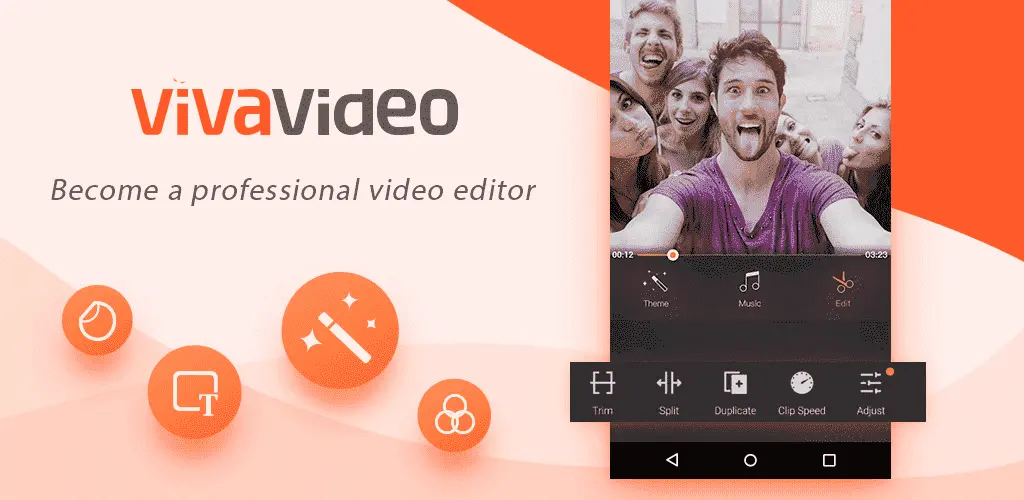
I used VivaVideo on a personal level to quickly edit videos for social networks. What I particularly appreciated was its intuitive handling and clear interface, making it easy to integrate clips, transitions and music. Its strong point lies in its simplicity of use mixed with sufficient functionality to create quality videos without complexity.
In a professional context, VivaVideo stands out when it comes to producing mobile content or short promo clips. Its direct integration with platforms such as Instagram or TikTok facilitates rapid publication. This fluidity makes it an excellent tool for projects requiring "on the go" editing.
However, VivaVideo displays limitations on more complex projects, notably for advanced multi-track editing or advanced colorimetric calibration. The lack of certain professional options may hold back users seeking more control and customization.
Is VivaVideo really useful for my needs?
The real question to ask is: do you need a quick and easy tool for editing videos on your smartphone, without being an expert? VivaVideo targets just such users who want to quickly assemble creative videos without sacrificing basic visual quality.
Among the relevant personas are:
- Beginner content creators who want to share quick vlogs or tutorials.
- Marketers making short stories and clips to boost engagement.
- Mobile videographers looking for an agile solution on the go.
- Influencers who frequently post content on Instagram or TikTok.
Another highlight of VivaVideo is its vast catalog of free effects, transitions and music, which makes creativity much easier without the need for additional tools.

Is VivaVideo suitable for beginners?
Absolutely, VivaVideo is designed for novice users. Its intuitive interface offers easy access to basic functions such as trimming, adding music, filters and transitions. The uncluttered design invites fearless exploration.
Beginners also benefit from a built-in library of effects and automations that greatly simplify creation, enabling the production of aesthetically pleasing videos without prior technical skills.
How much does VivaVideo cost?
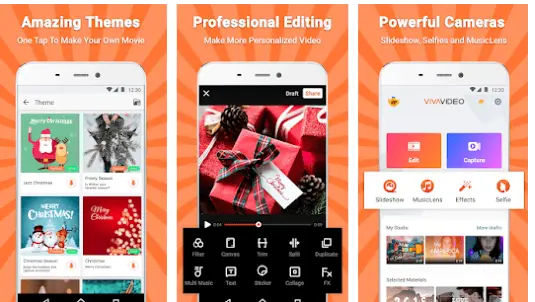
VivaVideo offers a free version with basic functionality, ideal for occasional users or those who want to test the application. This version includes access to essential tools but displays a watermark on videos and limits certain advanced options.
To remove these restrictions, the premium version is available via monthly or annual subscription. It offers:
- Removal of the watermark
- Access to the entire library of effects, music and filters
- Export in high definition up to 4K
- Advanced editing features
This package is suited to regular and professional creators looking for a complete experience without technical disruption, with a generally affordable price for a mobile tool.
What are VivaVideo's key features?
VivaVideo's first key feature is its simplified video editing directly from a smartphone or tablet. The tool offers intuitive options for trimming, merging and organizing your clips without complexity. This ease of editing facilitates the rapid creation of engaging videos.
Another major feature is the extensive built-in library of visual effects, filters, stickers and animated transitions. These resources enable videos to be enriched with a variety of styles, responding to current trends and users' creative needs.
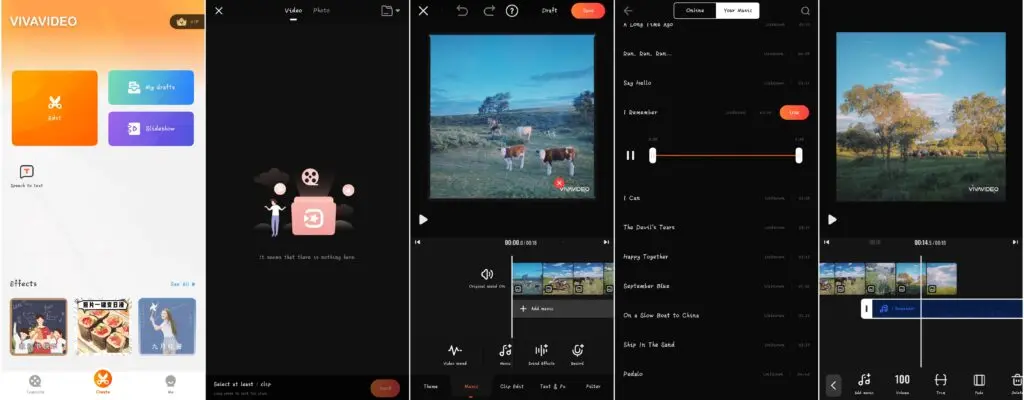
In addition to the basic functions, VivaVideo offers advanced features such as the ability to add animated text and multiple audio tracks, enhancing the personalization of video projects. This enables the creation of more dynamic and professional formats.
The software also supports high-resolution export (including 4K), meeting the quality requirements of modern social platforms. Finally, direct integration with social networks facilitates instant publishing and content sharing.
VivaVideo proves less suited to projects requiring sophisticated editing, such as advanced multi-track editing, fine color correction or precise audio management. For these cases, solutions such as Adobe Premiere Pro or DaVinci Resolve are far more appropriate.
However, VivaVideo remains a solid option for short, fast-moving content. Other competitors such as InShot or KineMaster also offer a good alternative with more technical options, while remaining accessible to novices.
In summary, VivaVideo presents an excellent compromise between simplicity and functionality, with notable advantages on the move, in the face of some limitations inherent in its consumer-oriented design.
FAQS
Is it reliable and secure?
VivaVideo is a reliable application with compliance with current mobile security standards. User data is protected by encryption protocols during exchanges, and the app respects the rigorous privacy policies of the Android and iOS platforms.
In terms of robustness, its interface is regularly updated to correct bugs and improve stability, guaranteeing a smooth experience. Secure content and no unauthorized access make it a safe choice for creators.
Is it compatible with my other tools?
VivaVideo is compatible with all major mobile operating systems such as Android and iOS, guaranteeing wide accessibility. It supports standard video formats such as MP4, AVI, and MOV for imports and exports, making it easy to exchange files.
Furthermore, the app offers direct integration with several popular social networks (Instagram, TikTok, Facebook), enabling immediate sharing and publishing of your creations.
Is there responsive customer support?
VivaVideo customer support is accessible via the app and official website, offering a help center featuring FAQs, video tutorials and user forums. Response times are generally fast for routine queries.
For premium subscribers, priority customer service is available, with more personalized support for technical issues or specific needs.
What do other users think?
Users often praise VivaVideo's ease of use and wealth of effects on offer, making it a very popular app for mobile editing. Many appreciate the speed with which they can create and share quality videos.
However, some point to limitations in the advanced options and the presence of the watermark in the free version. A few reviews also point to occasional bugs, which are usually quickly corrected.
Can I easily change later?
Users often praise VivaVideo's ease of use and wealth of effects on offer, making it a very popular app for mobile editing. Many appreciate the speed with which they can create and share quality videos.
However, some point to limitations in the advanced options and the presence of the watermark in the free version. A few reviews also point to occasional bugs, which are usually quickly corrected.
Alternatives
.svg)

Specializing in business creation, sales and digital marketing, he puts his expertise at the service of users to help them identify the solutions best suited to their needs. Passionate about digital innovation and optimizing online performance, Alexis is committed to providing detailed, transparent and unbiased comparisons.
Do you have an entrepreneurial project?
We support you in the structuring and development of your tech project. Make an appointment with one of our Business Strategists.