


.avif)





.svg)



Should Tray.io be used in 2025?

Tray.io has established itself as a powerful and flexible automation platform, dedicated in particular to development professionals and web agencies. Its low-code/no-code approach enables various online services to be orchestrated and connected, saving valuable time and optimizing business processes. This solution aims to simplify complex tasks while remaining scalable for demanding business environments. But how can Tray.io really leverage the growing number of SaaS tools used on a daily basis? This article offers a comprehensive analysis to answer this crucial question and shed light on the use of Tray.io in 2025.

My experience with Tray.io
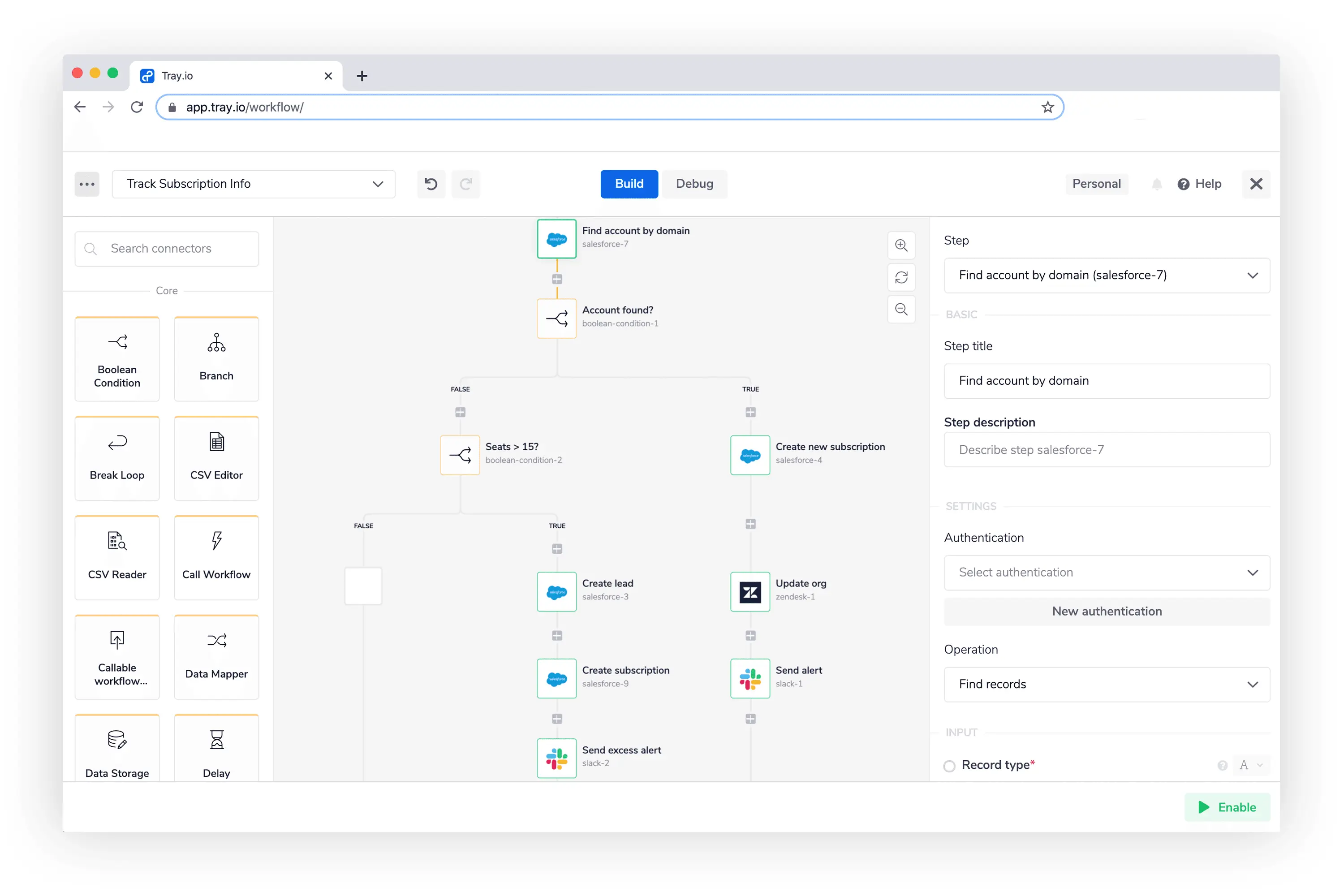
I've used Tray.io mainly in a professional context to automate complex workflows between several SaaS applications. Its visual interface, combined with drag-and-drop logic, makes it easy to create custom automations without having to code everything in depth. What particularly impressed me was its **extreme flexibility, enabling workflows to be adapted to almost any specific business need**.
Tray.io excels particularly in environments where several systems need to communicate in real time, such as CRM, marketing automation, or sales management. Its advanced integration capabilities make it possible to orchestrate multifaceted processes without compromise.
However, the platform does present some limitations, especially for very small projects or complete beginners, as complexity can quickly grow. What's more, the cost remains substantial for structures with limited budgets.
Is Tray.io really useful for my needs?
The real question to ask yourself before adopting Tray.io is whether your organization needs a powerful, customizable automation platform.
This solution is ideal for several personas:
- Digital agencies who manage many customers and want to automate their CRM, billing and campaign management.
- Developers and integrators who need to create complex workflows without writing massive amounts of code.
- Technology startups requiring fast, scalable integrations between products.
Another strong point of Tray.io is its ability to integrate a multitude of different APIs, making it a very robust and adaptable tool whatever the business context.

Is Tray.io suitable for beginners?
Tray.io is best suited to users with a moderate to advanced technical level. Its visual interface makes it easy to get to grips with, thanks in particular to drag-and-drop functionality that lets you build workflows without writing code.
However, for a complete beginner with no prior knowledge of automation or APIs, this tool may seem complex. The advanced features and multitude of options require a certain learning curve. On the other hand, once this stage has been completed, the tool becomes very powerful and versatile, ideal for building up skills.
How much does Tray.io cost?
Tray.io offers several pricing packages tailored to different types of user:
- Starter package: around $595/month; ideal for small teams wishing to automate basic tasks with a limited number of executions and integrations.
- Professional package: from $1,195/month; designed for larger teams requiring complex integrations, advanced workflow management and premium support.
- Enterprise package: prices on request; includes customized options for security, scalability and dedicated support for very large structures.
Each offer targets a different persona, from small teams to large accounts, via agencies. It's important to assess your real needs before choosing the right package, as the price can quickly escalate depending on volume and functionality.
What are Tray.io's key features?
The first key feature of Tray.io is its intuitive visual interface, which enables automation workflows to be built via a drag-and-drop system. This makes it easy to quickly create and modify automations without coding.
The second key feature is its robust integration architecture with connectors for over 450 SaaS applications. This API orchestration capability makes it a powerful tool for synchronizing, transforming and managing complex data flows between different systems.
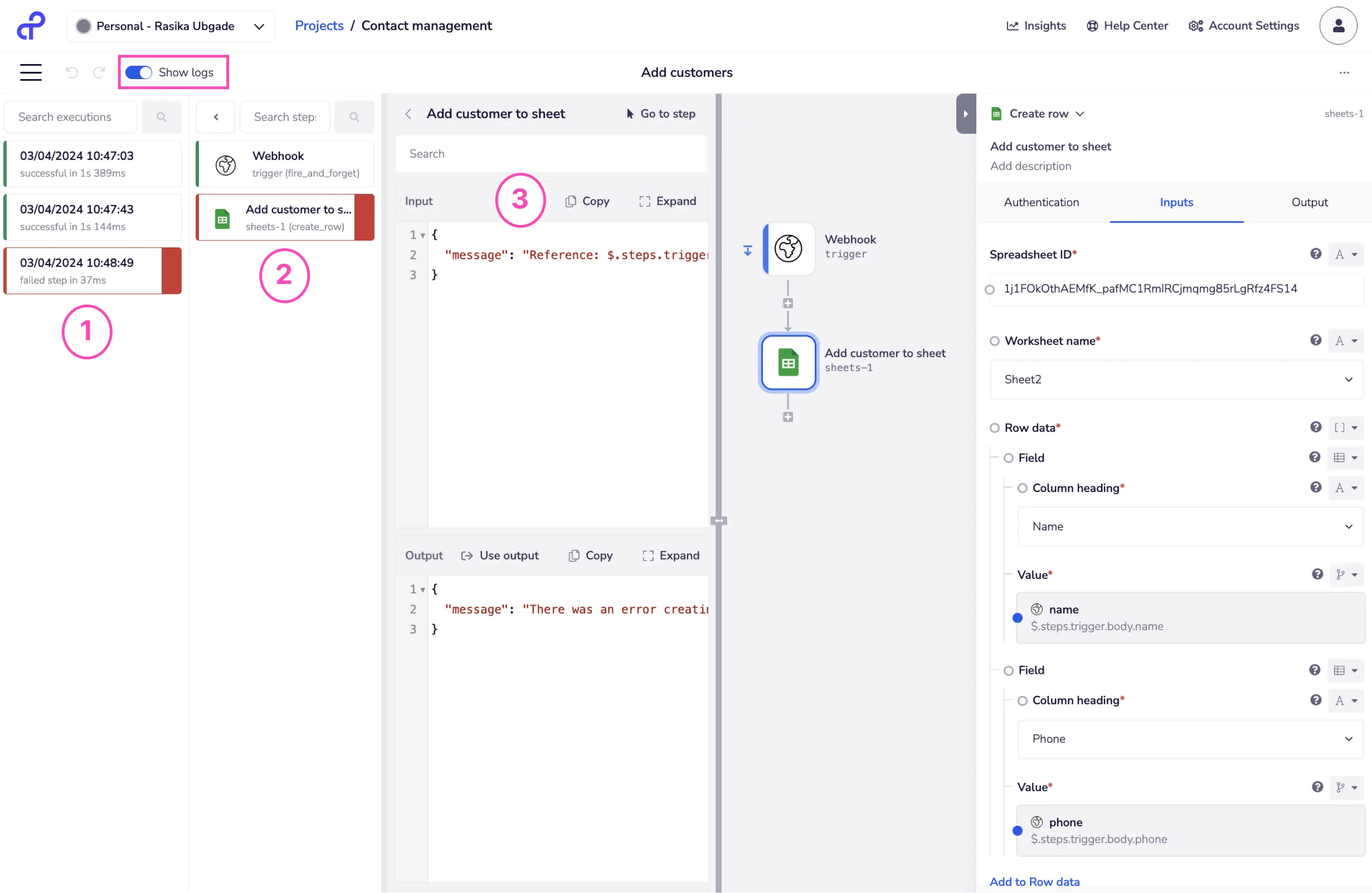
Among its advanced features, Tray.io offers advanced error handling capabilities, allowing exceptions to be managed in workflows and ensuring reliability.
The second advanced example is the ability to program conditional automations and loops, making the tool suitable for sophisticated business scenarios requiring precise control of the flow of operations.
.The limitations of Tray.io vary depending on the use case. For very basic automations or those intended for users with no technical knowledge, its interface may seem too comprehensive and intimidating.
On the market, competitors such as Zapier, Integromat (Make) or Microsoft Power Automate may represent more suitable alternatives for simpler needs or tighter budgets. However, Tray.io is clearly positioned in a more advanced and professional segment.
Thus, its advantages are its flexibility, integration power and scalability, while its disadvantages remain a high cost and a rather steep learning curve.
FAQS
Is it reliable and secure?
Tray.io is a reliable and secure solution employing modern protocols such as TLS for data-in-transit encryption and strict access management practices. The platform complies with industry standards for security and confidentiality.
Furthermore, Tray.io offers advanced options for controlling user permissions, API access management, and full traceability of actions, guaranteeing high robustness in demanding business environments.
Is it compatible with my other tools?
Tray.io offers broad compatibility with over 450 major SaaS applications thanks to its native connectors. It also offers a powerful REST API to enable custom integrations.
Support for standard JSON and XML formats ensures smooth communication with a variety of services and facilitates interoperability between systems.
Is there responsive customer support?
Tray.io's customer support is professional with generally fast response times for paying customers, especially on Professional and Enterprise packages.
They also offer comprehensive documentation and an active community portal that helps with common problems and practical advice.
What do other users think?
User reviews of Tray.io highlight its great flexibility and powerful integration capabilities as its main strengths.
On the other hand, some users mention a high price and a sometimes complex interface for novices, which can slow down adoption in some teams.
.Can I easily change later?
User reviews of Tray.io highlight its great flexibility and powerful integration capabilities as its main strengths.
On the other hand, some users mention a high price and a sometimes complex interface for novices, which can slow down adoption in some teams.
.Alternatives
.svg)

Specializing in business creation, sales and digital marketing, he puts his expertise at the service of users to help them identify the solutions best suited to their needs. Passionate about digital innovation and optimizing online performance, Alexis is committed to providing detailed, transparent and unbiased comparisons.
Do you have an entrepreneurial project?
We support you in the structuring and development of your tech project. Make an appointment with one of our Business Strategists.