


.avif)





.svg)



Should you be using Synfig Studio in 2025?

Synfig Studio is open source software dedicated to 2D vector animation, distinguished by its ability to offer a complete, professional environment at no cost. Accessible to content creators, videographers and production studios, it lets you design complex animations with fluid rendering thanks to its automatic interpolation technology. Synfig stands out as a solution suited to users with a good basic technical understanding who want to produce quality animated work without investing in expensive paid software.
Faced with the multitude of animation tools on the market, how does Synfig Studio differentiate itself and meet the specific expectations of professionals and discerning amateurs? In this article, we'll explore its features, strengths and limitations, enabling you to decide whether this software is relevant to your projects in 2025.

My experience with Synfig Studio
I've mainly used Synfig Studio for personal projects and some small professional 2D animation projects, particularly with designers wanting a free but powerful solution. What struck me was the stability and functional richness of the tool despite its open source status, with automatic vector rendering in interpolation that makes animation work easier. The quality of interpolation and layer management are the major strengths that make the experience fluid and offer precise control of animations without the need to redraw each frame.
Synfig excels when it comes to producing classic 2D animations, cartoons, motion graphics or animated video tutorials. Its flexibility will especially appeal to users with a minimum command of the interface and vector animation concepts. It integrates well into open-source or hybrid workflows, notably with complementary software such as Inkscape for graphic creation.
However, Synfig Studio has some notable limitations, including a fairly steep learning curve for beginners, an interface that looks a little dated, and some slowness on complex projects. The documentation, although under development, sometimes lacks clarity and updates can be irregular, requiring personal involvement to progress.
Is Synfig Studio really useful for my needs?
The real question to ask yourself before choosing Synfig Studio is: do you need a free 2D vector animation tool that's powerful but requires some technical involvement? This tool perfectly meets the needs of animated content creators, videographers looking to boost their videos with vector animations, as well as studios or marketing agencies that frequently produce animations without a large software budget.
More specifically, here are some personas for whom Synfig is relevant:
- The freelance motion designer who wants an open source alternative for complex animations.
- The savvy amateur videographer who wants to add vector animation to his projects at no extra cost.
- The marketing agency that regularly creates explainer videos or animated commercials without wanting to invest in expensive software.
- Independent production studios adopting open source tools to optimize costs.
Another strong point is compatibility with SVG formats and possible integration with other open source software such as Inkscape, which facilitates production and collaboration. So Synfig is a tool that, if it fits your profile, can really enrich your creations with powerful, customizable vector animations.

Is Synfig Studio suitable for beginners?
Synfig Studio offers an interface which, although complete and functional, may intimidate beginners. However, it incorporates features such as automatic interpolation and ready-to-use templates that make it easy to get to grips with, once a grounding in vector animation has been acquired. There are a number of online tutorials and an active community to help novices.
For a motivated beginner, the practical advantage lies in the opportunity to explore 2D animation creation without financial commitment, while developing solid technical skills on a professional tool. Some parameters may seem complex at first, but once mastered, they open the door to professional-quality animations.
How much does Synfig Studio cost?
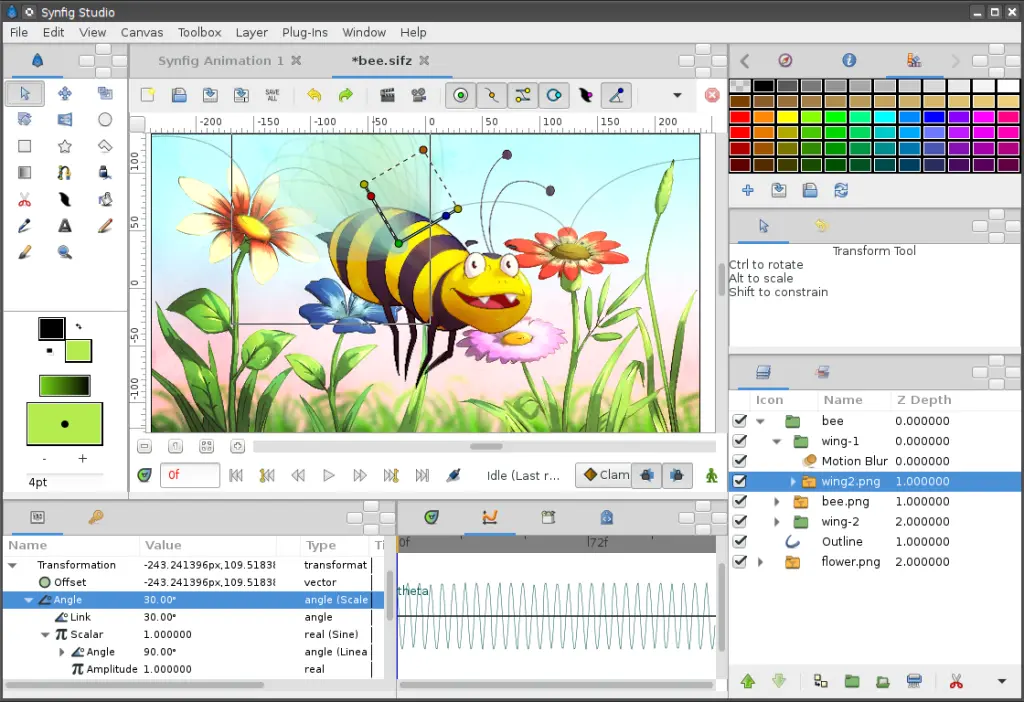
Synfig Studio is completely free of charge, which is a considerable advantage, especially for freelancers, students, or structures on a limited budget. This does not entail any noticeable compromise on the quality of the animations produced.
It is possible to contribute to the project via donations or community support, but no paid version or subscription is required to access the full range of features. This affordability allows any motivated user to experiment and produce professional 2D animations without initial investment.
What are Synfig Studio's key features?
The main key feature of Synfig Studio is its automatic interpolation system, which allows you to create fluid animations by defining only key points rather than each frame individually. This technique greatly facilitates the animation process, reducing the time and effort required.
Another major feature is advanced layer management, with the ability to use different types such as vector, bitmap, warp layers, as well as dynamic filters and transformations. This richness offers great flexibility in the creation and customization of animations.
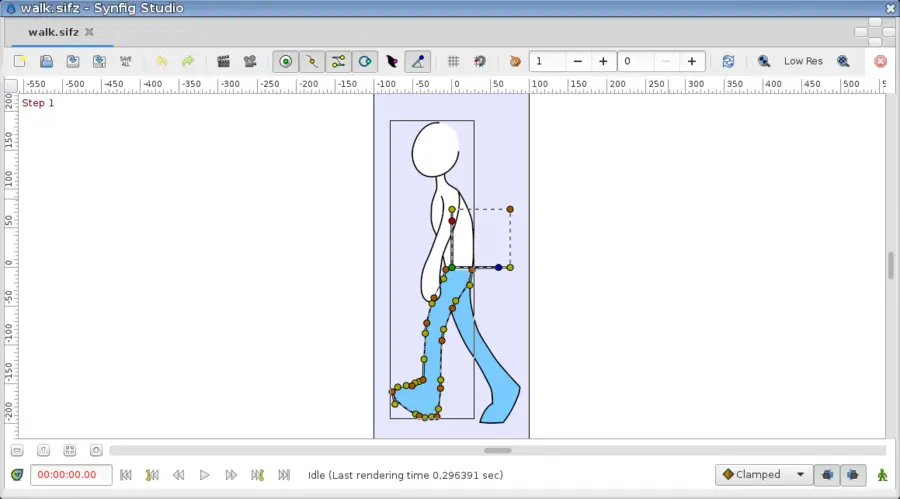
Beyond the basic functionality, Synfig Studio offers advanced tools such as Bézier curve manipulation for precise control of movements and shapes, as well as skeleton management (rigging) that makes it easy to animate complex characters and objects.
Furthermore, the software supports file import and export in a variety of formats, facilitating integration into professional and collaborative workflows. This compatibility is an asset when working with other graphics and editing tools.
Like all specialized software, Synfig Studio has its limitations, which need to be considered on a case-by-case basis. For 3D animation, advanced visual effects or complete video editing, the tool will not be suitable. Its specialization in 2D vector animation makes it less versatile than some all-in-one competitors. However, alternatives such as Toon Boom Harmony, Adobe Animate or even Blender offer more advanced functionality with more robust commercial support. In spite of this, Synfig retains a major advantage with its open source model and total gratuity, making it a popular solution in contexts of use where cost is a determining factor.
In summary, Synfig's main advantages are its power in vector animation and its gratuity, while its disadvantages lie in its learning curve and some shortcomings in ergonomics and documentation. So it's an excellent tool for those willing to invest time for a free, complete solution.
FAQS
Is it reliable and secure?
Synfig Studio is open source software built on the robustness of a dedicated community that regularly updates the software. As a local application installed on your machine, it collects no user data, reinforcing project confidentiality and security.
The software is free from intrusive protocols and benefits from a stable architecture that enables it to operate without major risk of critical bugs or security flaws. Its open-source nature also allows total transparency over the code and any contributions, guaranteeing appreciable reliability for professionals.
Is it compatible with my other tools?
Synfig Studio is compatible with the main vector graphics formats, including SVG, and supports video export formats such as AVI, MPEG, and image sequences. It also offers bitmap layer import to mix vector drawings and raster images.
It can be easily integrated into production chains by combining with software such as Inkscape for graphic creation, or Blender and others for post-processing, making it highly versatile for different working environments.
Is there responsive customer support?
Official customer support for Synfig Studio relies mainly on an active community and online forums where users can find help, tutorials and share their experiences. There is no dedicated commercial support, but official documentation is regularly updated to make it easier to get started.
Response times can vary according to community activity, but the wealth of online resources often means that any technical issues encountered can be quickly resolved.
What do other users think?
User reviews frequently highlight Synfig Studio's power and free-of-charge features as its main strengths, appreciated in particular by freelancers and small structures. On the other hand, some regret a somewhat dated interface and a fairly steep learning curve.
Overall, the community values the tool for its stability and advanced 2D animation capabilities, while calling for improvements in ergonomics and documentation for greater accessibility.
Can I easily change later?
User reviews frequently highlight Synfig Studio's power and free-of-charge features as its main strengths, appreciated in particular by freelancers and small structures. On the other hand, some regret a somewhat dated interface and a fairly steep learning curve.
Overall, the community values the tool for its stability and advanced 2D animation capabilities, while calling for improvements in ergonomics and documentation for greater accessibility.
Alternatives
.svg)

Specializing in business creation, sales and digital marketing, he puts his expertise at the service of users to help them identify the solutions best suited to their needs. Passionate about digital innovation and optimizing online performance, Alexis is committed to providing detailed, transparent and unbiased comparisons.
Do you have an entrepreneurial project?
We support you in the structuring and development of your tech project. Make an appointment with one of our Business Strategists.