


.avif)





.svg)



Should OpenToonz be used in 2025?
OpenToonz is open source 2D animation software, widely used by professional animation studios and independent creators alike. Its main objective is to enable the creation of vector and bitmap animations with high-performance tools suitable for novices and advanced users alike. Highly appreciated for its flexibility and functional richness, OpenToonz stands out for being free, while offering an experience close to that of expensive professional software.
In a market saturated by proprietary solutions, OpenToonz poses a real accessible and powerful alternative. But is it really suited to the needs of content creators and studios today? This article offers you a complete analysis of this tool to better understand its strengths and limitations in your animation projects.
My experience with OpenToonz
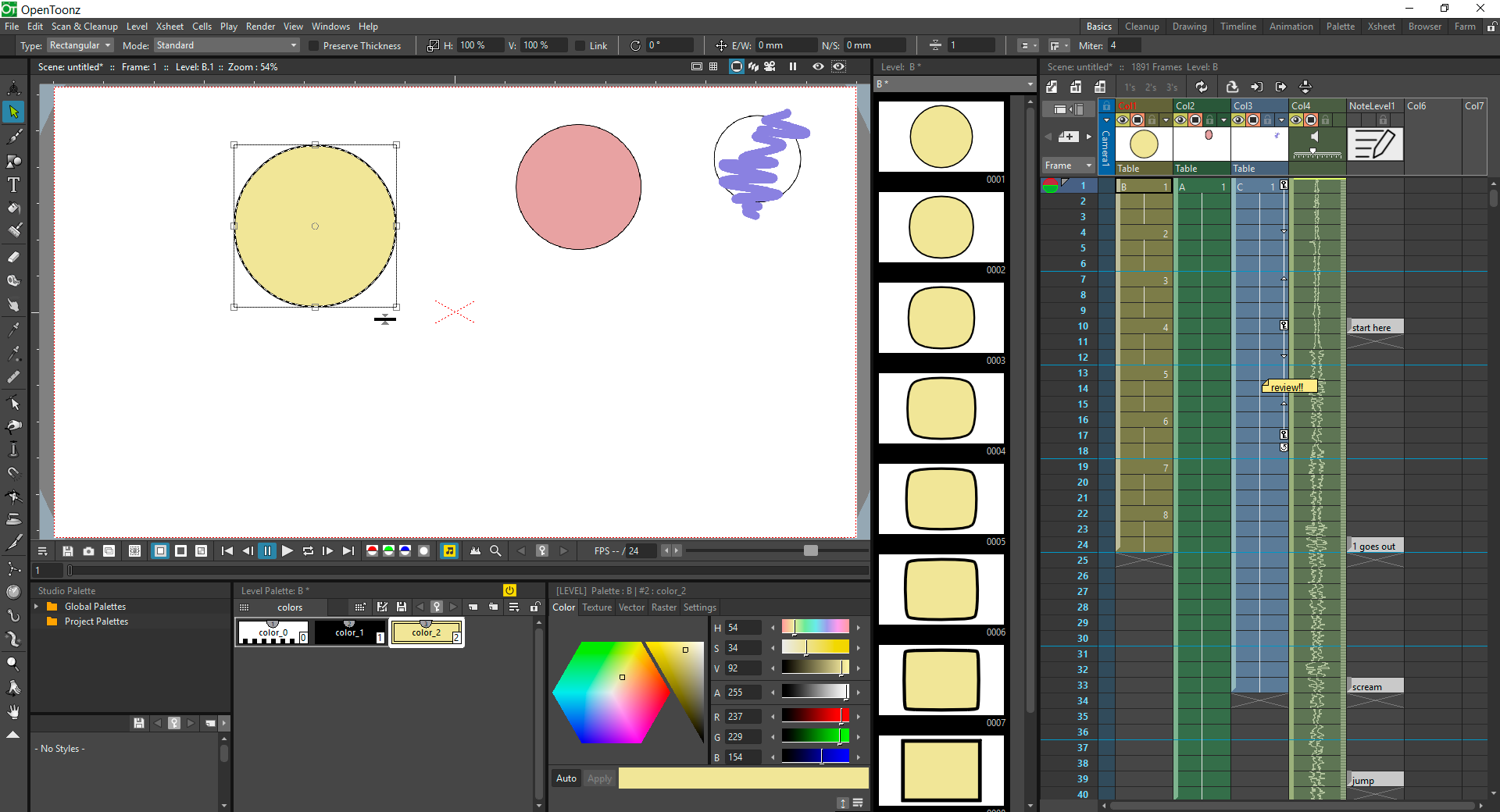
I've used OpenToonz both personally and professionally to create various 2D animations. What I particularly appreciated was its functional richness and above all its free aspect without any major compromises on quality, which is a real asset. The numerous drawing and animation tools combined with the management of layers and effects make it a robust software for creating a variety of projects.
OpenToonz excels particularly when working on traditional digitized animations or projects requiring advanced visual effects. Its rendering engine and customization options offer real creative power during the animation phase. I was also able to test its integration with scripts to automate certain tasks, which saves precious time.
Despite its strengths, I did come across a few limitations, notably a sometimes confusing interface for new users and a certain lack of fluidity in interactions compared to more modern software. The lack of dedicated sales support may also hold back some professionals looking for quick guidance.
Is OpenToonz really useful for my needs?
The real question to ask yourself before getting started with OpenToonz is: do I need a specialized 2D animation tool with great flexibility and no cost? If your work involves the creation of cartoons, clips or vector animations, OpenToonz can meet precisely these needs thanks to its panel of dedicated tools.
Many profiles will benefit from this tool:
- Videographers wishing to enrich their videos with unique 2D animations.
- Production studios looking for a cost-effective solution for classic animated projects.
- Graphic artists wishing to explore traditional animation at lower cost.
- Animation teachers and students looking for a complete, free software package.
Another strength of OpenToonz is its compatibility with numerous import/export formats, guaranteeing seamless integration into various creative workflows. Its active community also provides valuable resources.

Is OpenToonz suitable for beginners?
OpenToonz may be suitable for beginners, but with a few caveats. Its interface isn't the most intuitive, which can be quite a steep learning curve for a complete novice. However, online tutorials and extensive documentation make it easy to get the hang of things gradually.
For a beginner, features such as the use of layers, animation timings management and vector drawing tools are all practical advantages for learning the basics of 2D animation without financial investment. This makes OpenToonz an interesting option for those wishing to take a serious introduction to animation.
How much does OpenToonz cost?
OpenToonz is totally free software. This lack of cost makes it a very attractive alternative to traditional animation software that requires an expensive subscription or purchase.
This free availability does not mean a lack of features or lower quality; on the contrary, OpenToonz is positioned as a professional tool that is accessible at no cost, making it particularly suitable for freelancers, students and studios with limited budgets.
What are the key features of OpenToonz?
One of OpenToonz's key features is its advanced 2D drawing and animation system. It allows you to create drawings from vector or bitmap layers, with fine management of strokes and colors, offering great precision in the realization of traditional or digital animations.
Another important feature lies in its effects and rendering options. OpenToonz incorporates a powerful engine capable of applying various special effects, deformations or filters that visually enrich projects, while offering the possibility of customizing these effects via scripts.

There's no shortage of advanced features, including support for image capture for traditional animation and the ability to import external images or sequences to animate.
Another advanced feature is the ability to automate certain tasks thanks to the integration of customizable scripts. This can greatly speed up repetitive workflows and improve the overall efficiency of animation projects.
OpenToonz has a few limitations depending on the use case. For highly complex 3D animations or with advanced video compositing needs, it will be less suitable. Similarly, those looking for an ultra-modern, intuitive interface may be disappointed by its ergonomics, geared more towards experienced users.
In this context, software such as Toon Boom Harmony or Adobe Animate offer a more immediate grasp and more integrated functionality in exchange for a paying license. Nevertheless, OpenToonz retains the advantage of zero cost and appreciable flexibility for many users.
Here's a summary of advantages versus disadvantages:
- Advantages:free, functional power, extensive customization, large community.
- Disadvantages: confusing interface, lack of commercial support, not well suited to 3D.
FAQS
Is it reliable and secure?
As an open source project, OpenToonz benefits from an active community that ensures the software's quality and security. The source code is regularly reviewed and improved, contributing to its robustness. What's more, being installed locally, it doesn't depend on a cloud connection, which limits the risks associated with external attacks or online data loss.
The software collects no personal data and its operation is based on stable standard protocols, guaranteeing a reliable and secure experience for both professional and amateur users.
Is it compatible with my other tools?
OpenToonz is compatible with numerous image formats (PNG, TIFF...), image sequences and videos (AVI, MOV). It also offers the possibility of importing PETS, PLT or SVG files for vector elements, widely used in animation.
Its open source architecture also facilitates integration via scripts and plugins, notably with workflows using other animation or video editing software, making it a highly flexible tool in production chains.
Is there responsive customer support?
OpenToonz does not benefit from traditional commercial customer support, but it does have an active online community via forums, groups and tutorials that provide solid guidance in resolving the majority of questions. Response times can vary according to the complexity of requests.
For users looking for professional support, you'll need to consider paid alternatives with dedicated assistance, as OpenToonz relies primarily on community self-help.
What do other users think?
User reviews of OpenToonz are generally positive, praising above all its affordability and rich functionality. Users appreciate the creative freedom it offers and its compatibility with many types of animation projects.
Criticisms mainly concern the sometimes-difficult handling and an interface that seems dated compared to more mature commercial software. Despite this, the active community and updates support a rewarding user experience.
Can I easily change later?
User reviews of OpenToonz are generally positive, praising above all its affordability and rich functionality. Users appreciate the creative freedom it offers and its compatibility with many types of animation projects.
Criticisms mainly concern the sometimes-difficult handling and an interface that seems dated compared to more mature commercial software. Despite this, the active community and updates support a rewarding user experience.
Alternatives
.svg)

Specializing in business creation, sales and digital marketing, he puts his expertise at the service of users to help them identify the solutions best suited to their needs. Passionate about digital innovation and optimizing online performance, Alexis is committed to providing detailed, transparent and unbiased comparisons.
Do you have an entrepreneurial project?
We support you in the structuring and development of your tech project. Make an appointment with one of our Business Strategists.