


.avif)





.svg)



Should you be using Nuke in 2025?

Nuke is an essential reference in the field of professional compositing and visual effects. Used by numerous film studios, agencies and post-production professionals, this tool offers impressive power and flexibility for creating complex compositions and advanced visual effects. Its reputation is built on its ability to handle demanding projects, often aimed at an expert audience.
But what place does Nuke really occupy in the world of editing and visual effects software today? Is it accessible to independent creators or reserved for major productions? This article will explore Nuke's features in detail, its advantages as well as its limitations, to help you judge whether it's right for your needs in 2025.
My experience with Nuke
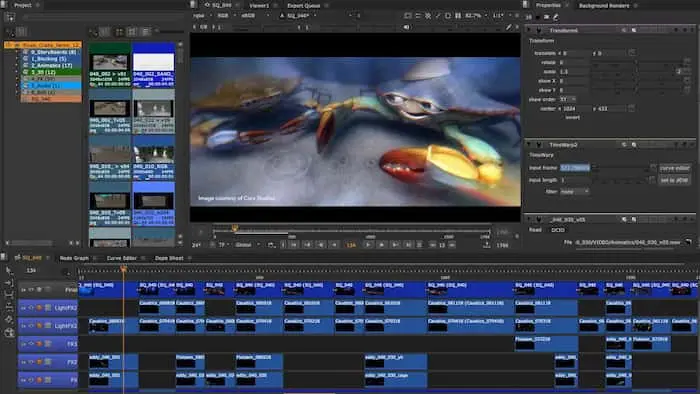
I've been using Nuke for several years, mainly in a professional setting for complex compositing and visual effects projects in film and advertising productions. What I particularly appreciate is its power and flexibility, which have enabled me to achieve detailed node-based compositions with very precise control. The node-based workflow is a strong asset for managing complex projects and keeping a clear vision even on complex scenes.
This software particularly excels in environments where scenes have multiple layers and effects to assemble, especially for 3D compositing, advanced rotoscoping and integrating effects into filmed shots. Its work with high-resolution formats and complex VFX pipelines make it a tool of choice for large-scale productions.
However, Nuke is not without its faults. Its steep learning curve may put off new users or novice freelancers. What's more, its subscription cost can be a hindrance to freelancers or small structures, who must therefore carefully assess their return on investment before choosing this tool.
Is Nuke really useful for my needs?
The real question to ask yourself before investing in Nuke is: do I need such powerful, specialized software? Aimed primarily at compositing and visual effects professionals, Nuke offers a palette of advanced tools that go far beyond classic video editing.
This makes it perfect for several types of profile:
- VFX studios: to manage complex, multi-layered projects with the integration of 2D and 3D elements.
- Advanced video and motion designers who want to master high-end visual effects for film or advertising productions.
- Marketing agencies working on video campaigns requiring specific effects and highly polished rendering.
- Trainers and specialized schools teaching advanced post-production and compositing.
Another strong point of Nuke is its ability to integrate into complex production pipelines by collaborating with other tools via various formats and scripts, making it a mainstay in the VFX industry.

Is Nuke suitable for beginners?
Nuke is generally not recommended for a total beginner in video or compositing. Its node-based interface and wealth of features require significant learning and a good understanding of compositing principles. For example, advanced notions of image processing, rotoscoping and keying are required to take full advantage of it.
However, for a motivated beginner user willing to invest time in training, Nuke offers tutorials and rich documentation. Its environment allows you to acquire solid expertise that can open doors in professional studios. In fact, some establishments use Nuke as a teaching standard to train future VFX artists.
How much does Nuke cost?

Nuke's pricing is positioned in a professional segment with an annual subscription that starts at around $499 per year. This includes full access to features and support.
This pricing targets studios and professionals looking for a high-end tool capable of handling demanding productions. It includes regular application updates, guaranteeing access to the latest innovations and bug fixes.
For smaller structures or freelancers, this expense must be justified by regular use and advanced needs. Foundry also offers floating licenses and options tailored to the size of the organization and specific needs.
What are Nuke's key features?
One of Nuke's major key features is its node-based compositing system. This mode of working allows different layers of images and effects to be manipulated in a non-linear and highly flexible way, offering precise control and clear management of complex projects.
Another important feature is built-in 3D compatibility. Nuke lets you import, manipulate and compose 3D scenes directly in the timeline, which is crucial for integrating realistic visual effects and creating sophisticated animations.
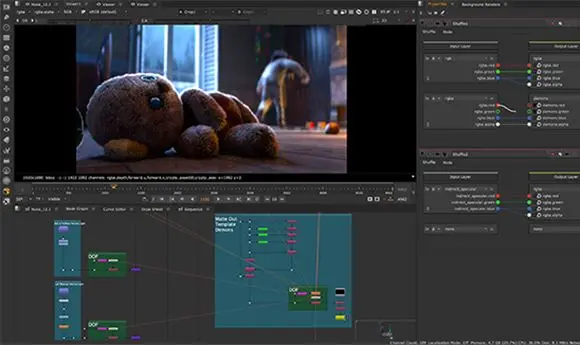
Among the advanced features, Nuke offers powerful rotoscoping tools for cutting moving objects very precisely. These tools greatly facilitate targeted inlays and modifications in complex sequences.
Furthermore, Nuke supports Python scripting, offering advanced automation of repetitive tasks and advanced workflow customization, indispensable in demanding production environments.
Despite its many strengths, Nuke does have its limitations, which need to be considered on a use-by-use basis. For example, it is not designed for quick video editing or simple projects, where more accessible software such as Adobe Premiere Pro or DaVinci Resolve would be more suitable.
In a freelance or freelance beginner context, its high price and the complexity of getting to grips with it can be major obstacles. For these users, tools such as HitFilm Pro or Blackmagic Fusion may be more affordable alternatives while still offering advanced features.
Finally, if linear editing and sound are the priorities, Nuke will not be the appropriate tool as its focus remains on compositing and visual effects. However, its major advantages remain its technical power and integration into professional pipelines, justifying its use in demanding environments.
FAQS
Is it reliable and secure?
Nuke is a reliable, secure application developed by Foundry, a recognized player in the VFX industry. It follows standard security protocols in the management of data and projects in production.
The software is robust, regularly updated to correct any vulnerabilities and ensure compatibility with the latest hardware and software technologies. Permission management and compatibility with secure file systems are also important points that reinforce security in professional use.
Is it compatible with my other tools?
Nuke is compatible with a wide range of professional formats, including EXR, DPX, TIFF, and high-resolution video media used in film and advertising.
It offers numerous integrations via APIs and plugins that allow the software to be connected to other post-production tools and VFX pipelines, facilitating collaborative work between teams and studios.
Is there responsive customer support?
Foundry offers efficient customer support, accessible via several channels such as e-mail, telephone and a comprehensive online knowledge base. Response times are generally fast for subscriber customers, with sharp technical support tailored to the problems of advanced users.
What do other users think?
Nuke users often point to the software's exceptional power and functional richness, making it a preferred choice for complex projects. Positive feedback also includes the quality of the node-based workflow, which improves productivity and editing clarity.
On the other hand, some point to the difficulty of mastering the software and its high price, which may hold back freelancers and beginners. Nevertheless, these limitations are generally accepted by professionals due to the overall efficiency of the product.
Can I easily change later?
Nuke users often point to the software's exceptional power and functional richness, making it a preferred choice for complex projects. Positive feedback also includes the quality of the node-based workflow, which improves productivity and editing clarity.
On the other hand, some point to the difficulty of mastering the software and its high price, which may hold back freelancers and beginners. Nevertheless, these limitations are generally accepted by professionals due to the overall efficiency of the product.
Alternatives
.svg)

Specializing in business creation, sales and digital marketing, he puts his expertise at the service of users to help them identify the solutions best suited to their needs. Passionate about digital innovation and optimizing online performance, Alexis is committed to providing detailed, transparent and unbiased comparisons.
Do you have an entrepreneurial project?
We support you in the structuring and development of your tech project. Make an appointment with one of our Business Strategists.