


.avif)





.svg)



Should you be using Moovly in 2025?
Moovly is an online video creation tool aimed as much at content creators, freelance videographers, as at marketing agencies and studios looking to produce compelling videos quickly. Its main aim is to make it easy to produce animated videos, tutorials, marketing content or explainer videos without requiring advanced editing skills.
This tool begs the question: how do you optimize video production for professional rendering while reducing the time and resources committed? In this article, we'll explore the strengths and limitations of Moovly, to determine whether it's the right tool for your needs in 2025.
My experience with Moovly
I use Moovly mainly for online educational and marketing content creation projects. Its main asset is its ease of use, thanks to its intuitive interface, which enables you to produce animations and videos quickly without complex technical training. This facilitates production even in a reactivity-driven professional setting.
Moovly excels particularly in the production of animated explainer videos, tutorials or social content, thanks to its integrated libraries and pre-designed templates. These tools considerably reduce creation time while offering good customization.
On the other hand, its limitations appear for very advanced video editing needs such as fine editing, multiple track management or complex effects. This may restrict its use for high-end productions requiring total control.
Is Moovly really useful for my needs?
The real question to ask yourself before adopting Moovly is: do I need an accessible, fast, animated video-oriented tool to create impactful content without going into heavy technical detail?
Moovly is ideally suited to several profiles:
- Content creators wishing to design explainer videos without advanced skills.
- Marketing agencies looking to quickly produce video vignettes for social networks.
- Educators and trainers wishing to create easily animated teaching aids.
- SMEs and startups in need of a cost-effective tool for their digital communications.
Another strong point is its easy integration of a variety of multimedia elements, facilitating the creation of engaging content with a minimum of technical effort.

Is Moovly suitable for beginners?
Moovly is perfectly suited to beginners thanks to its clear interface and numerous pre-designed templates. These templates help to quickly structure a video without wasting time on complex editing. Drag & drop makes it easy to integrate elements, and getting to grips with it is almost immediate.
For a beginner, this means being able to create attractive animated videos without in-depth technical training, with professional results. The platform also incorporates tutorials to accompany the discovery of key functionalities.
How much does Moovly cost?
Free package: This allows you to experiment with the tool with limited access to the library and export in standard quality, but with a Moovly watermark. Suitable for beginners or small tests.
Pro package at $24/month: This offer gives access to all features, a complete library, export in Full HD without watermark, and priority support. Ideal for regular creators and small agencies who need professional videos fast.
What are Moovly's key features?
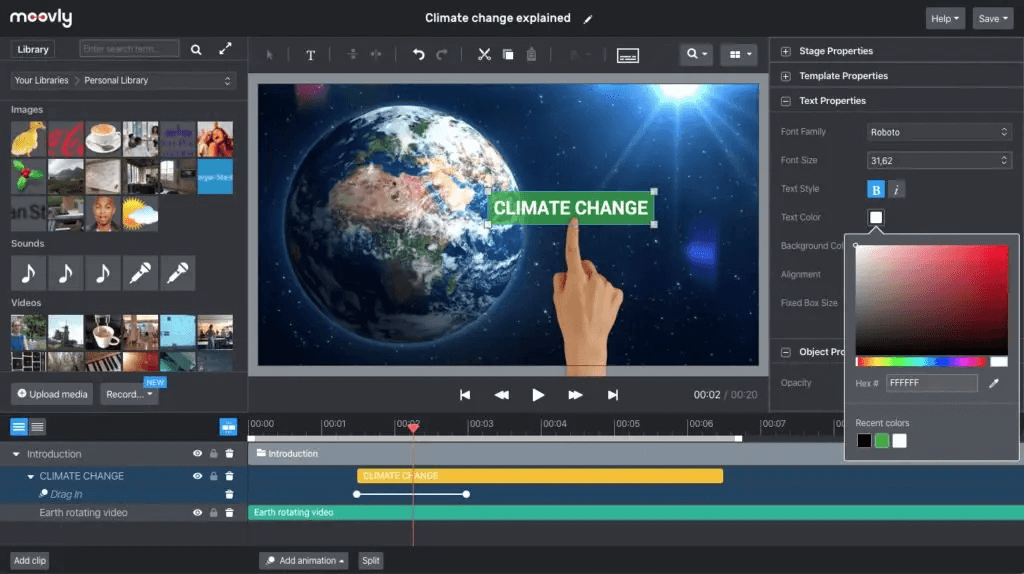
Moovly's first key feature is its multimedia content library, made up of thousands of ready-to-use videos, images, sounds and animations. This facilitates the rapid creation of animated videos without recourse to external elements, which is a real time-saver for creators.
Next, Moovly offers an intuitive drag & drop-based interface that simplifies video editing. Users can easily assemble scenes, add transitions, animated text and synchronize audio and video without complex technical efforts.
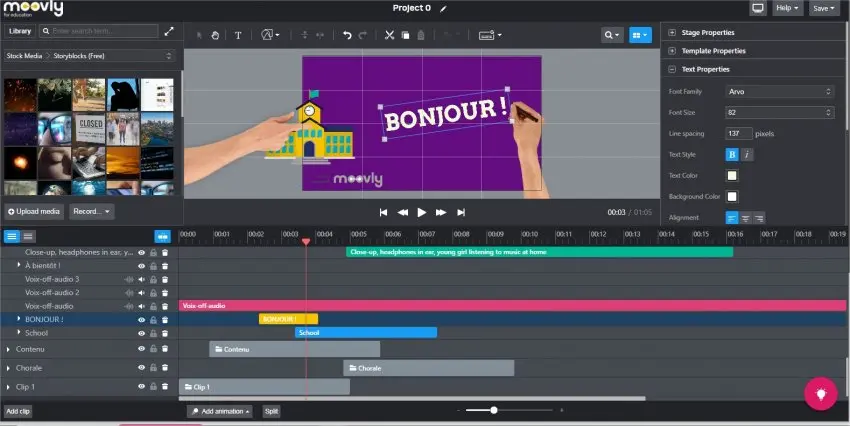
Advanced features include the ability to import personal media for extensive project customization. This makes it easy to integrate logos, brand images or specific music to perfectly match a graphic charter.
Another notable feature: export in different resolutions, including Full HD, and various formats suitable for social networks, ensuring optimal content distribution on all platforms.
Moovly shows its limitations in certain more advanced use cases. For example, it is not suited to complex professional video editing with advanced audio mixing, precise color corrections or multi-camera editing. For such needs, tools such as Adobe Premiere Pro or DaVinci Resolve are more recommended.
However, Moovly remains an interesting alternative to platforms such as Animoto or Powtoon, offering a good compromise between simplicity and functionality, ideal for quick and moderately complex projects.
Advantages vs. disadvantages:
- Advantages: simplicity, speed, rich library, affordable price.
- Disadvantages: limited highly advanced features, dependence on internet connection, export with watermark in free version.
FAQS
Is it reliable and secure?
Moovly uses standard data security protocols, notably HTTPS, thus ensuring the confidentiality and integrity of projects and user data during exchanges on the platform. Automatic backup and the secure cloud offer good robustness against data loss.
The platform is high-performance and stable, with high availability, but intrinsically depends on the quality of the internet connection, which is a factor to consider for users on the move or with limited access.
Is it compatible with my other tools?
Moovly supports import and export in popular formats such as MP4, MOV, JPG, PNG, and MP3. The tool also offers integrations with cloud storage platforms and social networks to facilitate direct content distribution.
Furthermore, the service offers an API for certain professional uses, extending its compatibility with other tools or customized workflows.
Is there responsive customer support?
Moovly customer support is accessible via chat and email, with generally fast response times on the Pro version. Online documentation and the knowledge base are comprehensive, facilitating self-help for common questions.
Free users may experience more limited support, which is a point to consider depending on support needs.
What do other users think?
Reviews from Moovly users highlight ease of use and the wealth of content available as the main positive points. Creators appreciate the speed of production and the quality of the animations.
On the negative side, some complain about the limitation of advanced features and the need for a good internet connection. The watermark in the free version is also often mentioned as a potential hindrance to professional use.
Can I easily change later?
Reviews from Moovly users highlight ease of use and the wealth of content available as the main positive points. Creators appreciate the speed of production and the quality of the animations.
On the negative side, some complain about the limitation of advanced features and the need for a good internet connection. The watermark in the free version is also often mentioned as a potential hindrance to professional use.
Alternatives
.svg)

Specializing in business creation, sales and digital marketing, he puts his expertise at the service of users to help them identify the solutions best suited to their needs. Passionate about digital innovation and optimizing online performance, Alexis is committed to providing detailed, transparent and unbiased comparisons.
Do you have an entrepreneurial project?
We support you in the structuring and development of your tech project. Make an appointment with one of our Business Strategists.