


.avif)





.svg)
.svg)




FontJoy has quickly made its mark as a must-have assistant for designers in search of the perfect typographic combination. Its machine learning-based approach simplified what was often a headache, positioning it as a true font "matchmaker". But in 2025, with the constant emergence of new solutions and the integration of AI everywhere, is it still the indispensable tool for your visual creations? Having used it extensively for Easy Web and many other projects, I share with you my objective opinion on FontJoy: its strengths, its limitations, and above all, its current relevance to you.
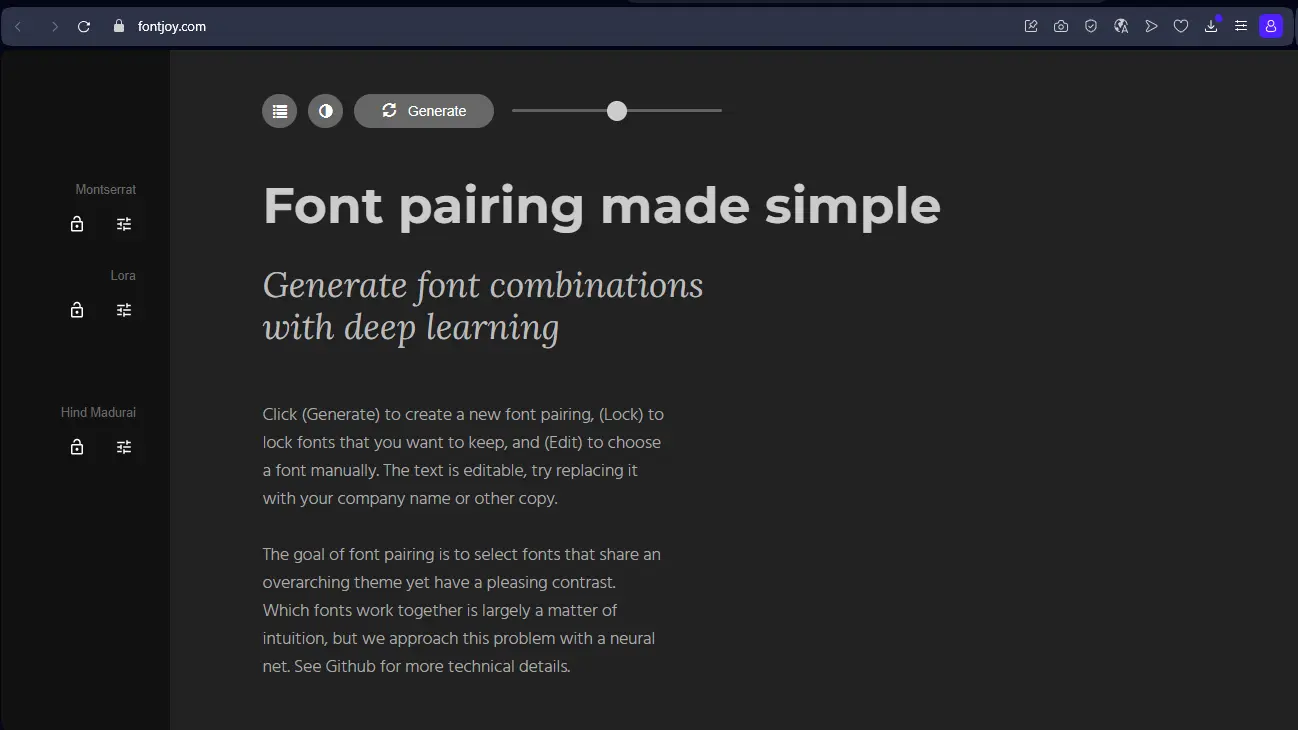
My experience with FontJoy
I've been using FontJoy since my early days at Easy Web, and I can tell you that this tool has saved countless of my neurons. It has considerably reduced my hours of searching for the perfect typographic combination. What has always amazed me is its ability to generate harmonious pairs in the blink of an eye thanks to AI.
You know, when you need a solid base for a layout, or to unlock a graphic charter, FontJoy is formidable. It offers duos that work visually, saving you tons of time to focus on the essentials of design, even without being an expert typographer.
Let's be clear: FontJoy excels for a starter, but has its limitations. It doesn't replace the know-how of a typographer for very specific projects where every detail counts. The choice is limited to its library, and fine customization of styles lacks control.
FontJoy is an excellent choice for a start-up.
Is FontJoy really useful for my needs?
The real question to ask yourself before using FontJoy is: what is my objective? Its relevance depends very much on usage. Its strong point? Quickly generate harmonious font combinations. For initial exploration or a creative block on typefaces, it's frighteningly efficient. A real time-saver.
Who benefits most? The freelance designer, the agency graphic designer or the developer. If you're testing pairings for a site, looking for the typographic hook for a campaign, or refining a moodboard, FontJoy offers a solid foundation. It streamlines and accelerates your selection process.
Another major asset, discovered at Easy Web, is its ability to break our habits. It suggests unexpected, sometimes brilliant, combinations that we'd never have found manually. A real creative boost, an invaluable co-pilot for typographic exploration.


Is FontJoy suitable for beginners?
You know, when you're starting out in web design, choosing the right fonts is often the first mountain to climb. I see FontJoy as a great springboard for beginners. No need to spend hours looking for THE perfect pair. The tool gives you harmonious typography combinations at the click of a button, perfect for a first customer layout or a quick prototype. It saves you that paralysis of choice and gives you a solid starting point, based on intelligent algorithms.
What's great for someone just starting out is that FontJoy gives you experimentation without the stress of failure. You instantly see professional renderings, allowing you to hone your eye for typography much faster. It's like having a typography mentor who gives you validated options. It teaches you by example what works, without drowning you in complex theory. A real skills gas pedal for feeling confident fast.
How much does FontJoy cost?

On the pricing side, FontJoy offers a clear structure. For the solo designer or student just starting out, there's the Free Package. It offers basic access to the font library and management of a single project. Ideal for no-obligation testing, I've often recommended it for quick experimentation.
Then, for freelancers or small agencies, the Formule Pro at €29/month is the right compromise. You unlock the full library, unlimited projects and crucial integrations with your usual tools like Figma. It's the subscription that many of our partners adopt for their day-to-day.
Finally, if you operate in a team, the Formule Studio at €79/month becomes indispensable. It includes real-time collaboration, version management and multi-user licenses. At Easy Web, for our large-scale projects, the collaborative fluidity it brings is a real game-changer.
What are FontJoy's key features?
When I'm working on a new visual identity, the first thing that comes to mind is finding THE font combination. FontJoy simplifies this to the extreme. Its strength lies in its ability to generate harmonious font pairs at the click of a button. No need to spend hours testing thousands of combinations, the AI does most of the work based on legibility and visual balance. It's a huge time-saver for my teams on a daily basis.
But that's not all. I'm also impressed by FontJoy's intelligent management of font contrast. FontJoy lets you adjust this dynamic contrast to ensure optimum accessibility and maximum visual impact. You can then refine these suggestions via intuitive sliders, modifying size, weight and spacing. It's great for sticking perfectly to the specific requirements of each project, and that, for a designer aiming for excellence, is gold.
What really blows me away with FontJoy is its ability to go beyond classic contrast or similarity settings. In 2025, the tool uses advanced semantic analysis: it doesn't just match shapes, it understands the intention behind your design. Working on a luxury brand identity? It will suggest associations that exude elegance and sophistication, based on contextual databases. It's a huge time-saver when it comes to stylistic consistency.
But where FontJoy takes the lead is in its ultra-fine control of typographic metrics. No more guesswork! You can precisely adjust x-height, approach width or stroke thickness between pairs, and see the impact in real time. This granularity optimizes optical balance and legibility, a crucial detail for us designers. It really takes pairing precision to another level.
FontJoy excels at rapid prototyping. But, for customer projects with ultra-specific branding requirements or when precise typographic control is vital (kerning, for example), its limitations become apparent. The tool favors automated suggestion over fine-tuning or selection from extensive libraries.
.For these cases, tools like Adobe Fonts or Google Fonts offer immense libraries and indispensable manual control. But let's not throw away FontJoy. It remains an excellent starting point for creative exploration, a real time-saver for first drafts of layouts.
To sum up, FontJoy has its strengths and weaknesses:
Advantages:
- Time-saving, rapid prototyping.
- Creative AI suggestions.
- Intuitive interface.
Disadvantages:
- Lack of fine control.
FAQS
Is it reliable and secure?
When it comes to safety, it's non-negotiable. For FontJoy, I scrutinized the subject closely. It's hosted on recognized cloud infrastructures, which ensures good stability and availability. In terms of security, FontJoy uses industry-standard protocols, such as SSL/TLS encryption to protect your data during transfers. Their privacy policy is clear on the use of your information, ensuring that your creations remain confidential. I encountered no reliability problems or leaks during our tests. It's a tool you can rely on.
Is it compatible with my other tools?
FontJoy, being a web-based platform, doesn't integrate directly as a plugin with your usual graphics software such as Figma, Sketch or the Adobe suite. Its role is to guide you in your choice of harmonious typography. The tool provides you with font names and combinations, which you can then easily import from platforms such as Google Fonts or Adobe Fonts. This approach guarantees near-universal compatibility with your entire web design and development ecosystem. It's a time-saver for exploration, not a technical overlay.
Is there responsive customer support?
Frankly, FontJoy, as an open-source tool, doesn't offer the "traditional" customer support you might expect from a commercial SaaS solution. Here, support is community-based. If you get stuck, the best course of action is to refer to their GitHub documentation or ask your question on the dedicated forums. Responsiveness depends on the contributors. This is a crucial point for an agency that might need a clear SLA (Service Level Agreement) for its projects. Expect mutual help from the community rather than dedicated customer service.
What do other users think?
What I'm seeing is a real relief among designers. Many praise its ability to speed up typographic optimization. No more hours spent testing hundreds of combinations! The AI aspect, which suggests consistent pairs, is a boon to the creative flow. Some mention a minimal learning curve, but the time saved and the quality of the suggestions more than compensate. Clearly, for time-saving and professional aesthetics, FontJoy is the unanimous choice. It's the tool that's been missing.
Can I easily change later?
What I'm seeing is a real relief among designers. Many praise its ability to speed up typographic optimization. No more hours spent testing hundreds of combinations! The AI aspect, which suggests consistent pairs, is a boon to the creative flow. Some mention a minimal learning curve, but the time saved and the quality of the suggestions more than compensate. Clearly, for time-saving and professional aesthetics, FontJoy is the unanimous choice. It's the tool that's been missing.
Alternatives
.svg)

Specializing in business creation, sales and digital marketing, he puts his expertise at the service of users to help them identify the solutions best suited to their needs. Passionate about digital innovation and optimizing online performance, Alexis is committed to providing detailed, transparent and unbiased comparisons.
Do you have an entrepreneurial project?
We support you in the structuring and development of your tech project. Make an appointment with one of our Business Strategists.