


.avif)





.svg)
.svg)



Should you use Colorbox (Lyft) in 2025?
.png)
Colorbox by Lyft has earned itself a fine reputation in the design world, establishing itself as a benchmark for generating harmonious and accessible color systems. But in 2025, with rapidly evolving tools and expectations, is it still the ideal tool for your visual design projects? Simplicity, hidden features, and even its little weaknesses... I've been using Colorbox (Lyft) for several years now, and here I share my comprehensive feedback and objective opinion on its real usefulness, depending on your needs.
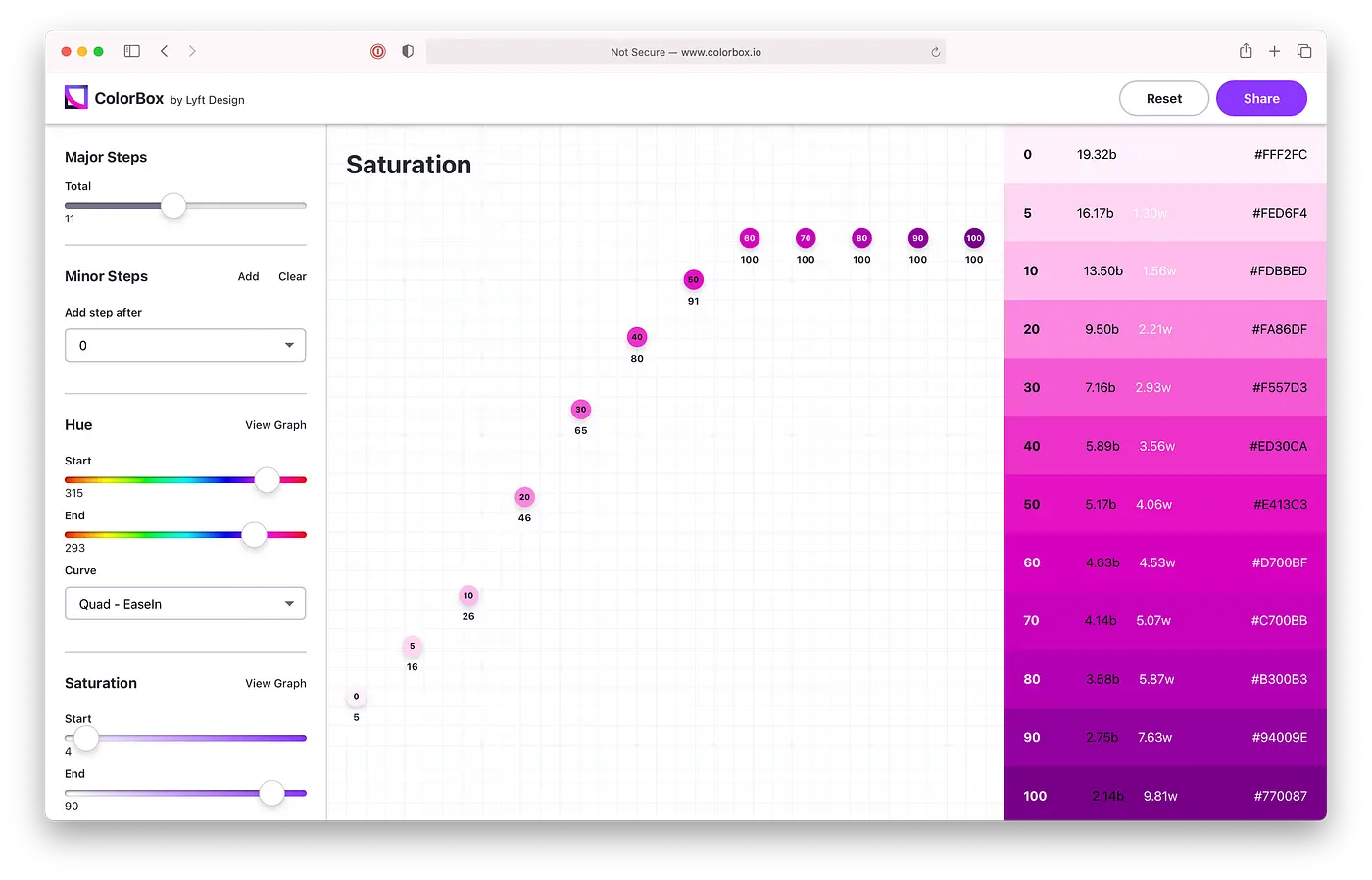
My experience with Colorbox (Lyft)
Trust me, Colorbox, I know it by heart. Since I started with Easy Web in 2020, I've seen it evolve, integrated it into our workflows and used it on countless customer projects. Each time, it has proven its worth to me, especially when it comes to generating consistent, accessible color palettes in the blink of an eye.
Have you ever struggled to find the right shade, the one that passes contrast for accessibility while remaining aesthetically pleasing? That's where Colorbox becomes your best ally. Its algorithm isn't just a random generator; it understands chromatic relationships and WCAG (Web Content Accessibility Guidelines) requirements, saving you an inordinate amount of time and ensuring a solid foundation for your visual identity.
But Colorbox, powerful though it is, is no substitute for the designer's eye. For very specific creations, unique universes or an exploration beyond the established rules, it's sometimes necessary to step outside the box and refine manually. It lays the foundations, the rest is up to us.
Is Colorbox (Lyft) really useful for my needs?
The real question to ask yourself before using Colorbox (Lyft) is: what is my objective? Because the relevance of Colorbox (Lyft) depends very much on how you use it. If you're looking to generate complete color systems, with precise hue and shadow variations, while ensuring accessibility from the outset, then yes, Colorbox is an extremely useful tool.
It's particularly effective for UI/UX designers, systems design architects or agencies building complex digital products. You can use it to create a basic color palette, then automatically generate all the necessary variations for interface states (active, hover, disabled) or semantic ranges (success, error), all in compliance with WCAG standards.
Colorbox is an extremely useful tool for UI/UX designers, design systems architects or agencies building complex digital products.
Another strong point is its ability to produce perceptually uniform color gradients. This means your palettes don't just look pretty, they're also intelligently constructed for a better user experience.


Is Colorbox (Lyft) suitable for beginners?
For those new to color management or looking for a less intimidating approach, Lyft's Colorbox is a breath of fresh air. I've seen designers at home quickly adopt it, especially for generating harmonious palettes without drowning in theory. Features such as instant preview and guided adjustments make first iterations much easier. No more fumbling for hours to find the right gradient or shade; the tool pushes you towards aesthetic and functional choices.
What I like about Colorbox is that it democratizes access to professional colorimetry. The interface is super-intuitive, which drastically reduces the learning curve. For a junior, it's an excellent basis for understanding how hues interact, how to manage contrasts for accessibility - fundamentals that you learn "by doing". It gives you confidence and enables you to produce quality deliverables without being a color harmony expert from day one.
How much does Colorbox (Lyft) cost?
When we talk about Colorbox, we have to understand that Lyft has really thought about different scales of use, and that's what makes it so strong.
For the solo designer or small team who just wants to test the waters, there's the Free Package. It's perfect for exploring the basics of palette generation and getting to grips with the interface. Zero cost, ideal for novice freelancers or personal projects.
Then, for pros and studios looking to step up a gear, the Pro package is €29/month. There, you unlock integration with other tools in the Lyft suite, more advanced generation algorithms, and most importantly, real-time collaboration features. This is the choice I recommend for medium-sized web agencies and experienced designers managing demanding customer projects.
Finally, for larger structures and corporate teams, they offer the formule Entreprise sur devis. This is tailor-made, with dedicated support, API access and advanced team management options. Typically for large groups and agencies with deployment needs at scale.
What are the key features of Colorbox (Lyft)?
What really impressed me about Colorbox was its ability to integrate WCAG (Web Content Accessibility Guidelines) compliance right from palette generation. No more tedious back-and-forth to check contrast ratios. The tool intuitively guides you to color combinations that meet accessibility standards, ensuring that your designs are inclusive right from the start. It's a huge time-saver for any agency.
Beyond accessibility, Colorbox excels at creating dynamic color relationships. Rather than simply generating random colors, it offers variations based on sophisticated algorithms. You can easily adjust brightness, saturation or hue while maintaining perfect visual harmony, making exploring new creative avenues fluid and intuitive.
You know, finding the perfect palette, one that not only clicks visually but also passes all the accessibility tests, is a headache. Colorbox excels here with its shade generation algorithm. It doesn't just suggest colors; it intelligently creates variations in brightness and saturation, guaranteeing WCAG (Web Content Accessibility Guidelines) contrast ratios. For us at Easy Web, this has become a huge time-saver, ensuring that our designs are beautiful and inclusive right from the start.
But where Colorbox really reveals its full power for an agency like ours is its integration and preview flexibility. Forget tedious manual exports. The tool lets you instantly visualize your palettes on sample interfaces, and above all, export values directly in CSS or JSON. No more endless back-and-forth with developers to adjust shades! It streamlines our workflow and ensures impeccable consistency from concept to production.
Listen, Colorbox is ideal for getting started quickly, but I quickly saw its limitations on ultra-precise projects. For complex design systems or very strict graphic charters, it lacks depth. The subtlety of gradients or the management of UI states (hover, active)? The tool quickly shows its limits.
For these advanced needs, Adobe Color or Coolors offer much finer granularity and exploration. This is where they excel. However, for quick exploration or creating a solid foundation, Colorbox remains an excellent starting point. It clearly saves you a lot of time.
Highlights:
- Fast pallet generation.
Weak points:
- Limited for complex systems.
- Lack of precision for strict branding.
- Basic management of UI states.
FAQS
Is it reliable and secure?
The question of reliability and security is crucial, I know. With Colorbox, developed by an entity like Lyft, you benefit from a robust infrastructure. Their servers are designed for scale, ensuring excellent uptime. On the security side, the tool uses standard encryption protocols (SSL/TLS) to protect your data and the palettes you create. At Easy Web, we have never encountered any data integrity problems or major malfunctions. For a tool of this type, it's a solid foundation to rely on.
Is it compatible with my other tools?
Yes, absolutely. That's a key point for a modern tool. Colorbox (Lyft) is designed to integrate seamlessly with your design ecosystem.
You can export your color palettes in a variety of standard formats such as CSS, JSON or SCSS, making it easy to integrate them directly into development projects. For design tools, although there isn't always direct native integration (plugins), hexadecimal or HSL values are easily copied and used in software such as Figma, Sketch, Adobe XD, Photoshop or Illustrator. That makes transferring color systems simple and efficient in your existing workflow.
Is there responsive customer support?
This is a key point for me, especially when you depend on a tool on a daily basis. With Colorbox, my experience and that of our teams has been positive overall. The Lyft teams behind Colorbox maintain a good level of support. We're talking about reasonable response times, often within 24 hours for non-critical queries. For bugs or more technical questions, they're generally quite efficient. It's still product support, not a 24/7 hotline, but they get the job done.
What do other users think?
The verdict from users is clear: Colorbox is a nugget. What stands out most often is its ability to generate palettes that comply with accessibility standards (WCAG), a huge time-saver for any project. This is something we've noticed internally at Easy Web. Some report a slight learning curve for the more technical nuances, but the general enthusiasm is palpable. A tool that truly simplifies the designer's life.
Can I easily change later?
The verdict from users is clear: Colorbox is a nugget. What stands out most often is its ability to generate palettes that comply with accessibility standards (WCAG), a huge time-saver for any project. This is something we've noticed internally at Easy Web. Some report a slight learning curve for the more technical nuances, but the general enthusiasm is palpable. A tool that truly simplifies the designer's life.
Alternatives
.svg)

Specializing in business creation, sales and digital marketing, he puts his expertise at the service of users to help them identify the solutions best suited to their needs. Passionate about digital innovation and optimizing online performance, Alexis is committed to providing detailed, transparent and unbiased comparisons.
Do you have an entrepreneurial project?
We support you in the structuring and development of your tech project. Make an appointment with one of our Business Strategists.