


.avif)





.svg)
.svg)




ArtRage has long been seen as a nugget for digital artists, standing out for its unique approach to traditional media textures and renderings, virtually unmatched on the market. It's a tool that brilliantly simulates oil paint, watercolor or pastels. But in 2025, is it still a good idea to use it for your visual creations? Simplicity, functionality, limits... I've been using ArtRage in my workflow for several years now, and here I share my detailed feedback and objective opinion on its real usefulness for your needs, as a design professional.
My feedback on ArtRage
I discovered ArtRage years ago, and it quickly became my little secret for personal illustration projects. It's a tool that gives me an almost physical feel for brush and material. What really won me over was the bluffing reproduction of traditional mediums.
This tool excels where others fail: faithfully simulating the behavior of oil paint, watercolor or pastel. Color blends are organic, the texture of brushstrokes palpable. For illustrators or concept artists looking for an authentic "handmade" rendering, this is a nugget.
But let's be clear, ArtRage has its limitations. It's not designed for advanced photo retouching, vector graphic design or complex page layout. Its specialization makes it a champion for painting, but it lacks versatility for the broader needs of a web agency.
Is ArtRage really useful for my needs?
The real question to ask yourself before using ArtRage is: what is my objective? Because the relevance of ArtRage depends very much on how you use it. If your goal is to faithfully reproduce the experience of traditional painting - thick oils, fluid watercolors, oil pastels - on a graphics tablet, then yes, ArtRage is a powerful tool, virtually unrivaled in this niche.
For an illustrator moving from traditional to digital, a concept artist who wants textured sketches, or even an enlightened amateur, ArtRage is a relevant choice. Imagine creating portraits with realistic impasto, landscapes where every brushstroke is visible, or character designs that look hand-painted. It excels where other tools merely simulate.
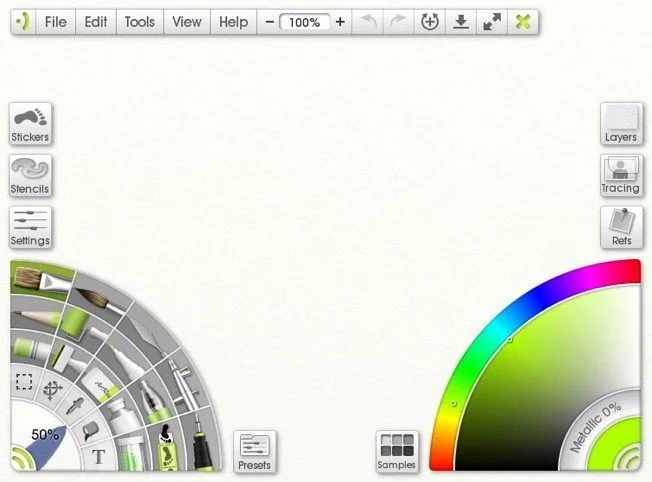
Its other major asset is its uncluttered interface, which focuses on the creative process. No distractions, just you and your canvas, with tools that react intuitively, just like real pigments.


Is ArtRage suitable for beginners?
Are you looking for a starting point for digital painting without feeling overwhelmed by complex interfaces? ArtRage positions itself right there, as an excellent springboard for any creative. Think of its brushes that react like real oil paint, its colored pencils or pastels that blend and spread ultra-realistically. It's ideal for those who want to explore digital creation with a natural feel, without drowning in layers of menus.
The great thing about ArtRage is this simplicity. You don't need to spend hours searching for a function or understanding complicated layers. The tool is designed so you can focus directly on your work, on the brushstroke, the texture, the color mixes. It's a highly accessible gateway that lets you unleash your creativity and quickly gain confidence in the world of digital art.
How much does ArtRage cost?
Let's talk money. For professionals, ArtRage stands out for its subscription-free model, an approach I particularly appreciate. The ArtRage 6 version, a perpetual license for Windows and macOS, typically costs around $79.90. It's a one-time investment that gives you access to all the advanced features: layer management, hyper-realistic digital painting tools, and customized brush creation. This formula is perfect for freelancers, solo illustrators or small structures who want a powerful tool with no monthly commitment.
For mobility, ArtRage offers dedicated apps on iOS and Android, sold separately for a handful of euros (often less than $10). These offer the essential tools for quick sketches or retouching on the go. They're an excellent complement for on-the-go creatives, but don't replace the depth of the desktop version for everyday professional work.
What are ArtRage's key features?
Directly, what blew me away when I discovered ArtRage was the incredible realism of its painting simulation. You're not drawing, you're manipulating matter. Oil paint spreads and blends just like on a real canvas, with those famous impasto effects that give your creations a tangible relief. Pigment reacts so faithfully, it's as if your screen were transformed into a living palette.
Beyond this fidelity, ArtRage's user interface is a model of clarity. Everything is thought out so as not to break your creative momentum. The variety of tools is a major asset: from delicately diffusing watercolors to colored pencils for precise textures, not to mention oil pastels. For us designers looking to vary digital mediums without getting lost in complex menus, this is a breath of fresh air.
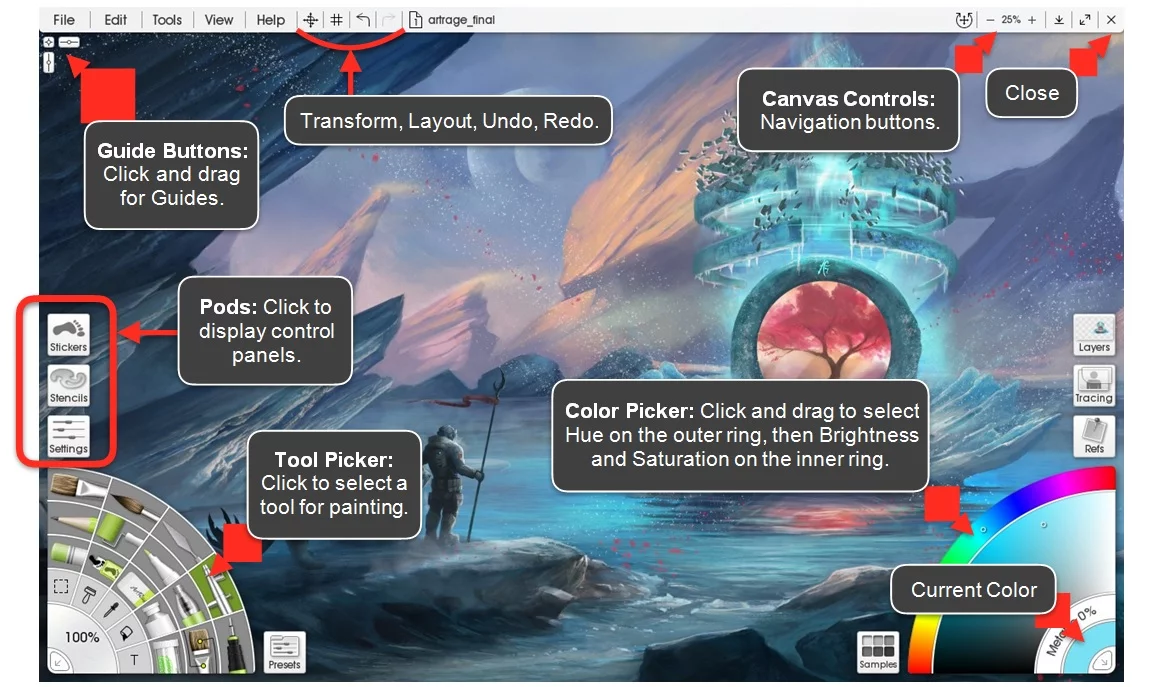
When you dive into ArtRage, the first thing that strikes you is the incredible realism of its tools. We're not just talking about brushes that look like watercolors; the software simulates the way paint mixes on the canvas, the pressure of the stylus, and even the absorption of the support. For us, who seek authenticity without the physical constraints, this fidelity in the simulation of traditional media is a major asset, enabling renderings of a rare richness.
Another highlight: the advanced management of surface textures and paint relief. Not only can you choose rough or smooth canvases, but ArtRage goes a step further by integrating a simulation of the actual thickness of brushstrokes. This feature adds a unique tactile dimension to your digital creations. It's this kind of detail that, frankly, makes the difference when you're aiming for a professional rendering, far beyond a simple flat image.
ArtRage, excellent for pure art, shows its limitations for pro design. Forget vector graphics for a logo, or complex photo retouching; it's not its core business. For web applications, such as UI/UX mock-ups, you'll quickly become frustrated. Its engine focuses on realistic painting, not versatile graphics production.
For these needs, I prefer Photoshop for advanced retouching or Illustrator for vector graphics. For web design, it's Figma, period. But ArtRage excels for pure illustration, offering a unique artistic feel. It's not meant to be all-purpose, and that's also its strength.
In summary:
Advantages:
- Simulation of traditional media.
- Intuitive interface for art.
- Lightweight, affordable.
Disadvantages:
- No vectors.
- Limited pro photo retouching.
- Inadequate UI/UX, complex production.
FAQS
Is it reliable and secure?
There's no doubt about its reliability. ArtRage is an established piece of software, benefiting from regular updates that guarantee its stability and bug fixes. When it comes to security, it's a tool primarily focused on the desktop. Your creations remain on your machine, minimizing the risks associated with external cloud services or third-party servers. The protection of your data will depend above all on the security of your operating system and your own backup practices. The publisher is transparent about how this works.
Is it compatible with my other tools?
Yes, absolutely. ArtRage is designed to integrate seamlessly into your design ecosystem. It exports your creations in standard formats such as PNG and JPG. More importantly, it allows you to export files with layers, notably in PSD format. This is essential for us professionals. So you can easily take your work back into Photoshop, Affinity Photo or any other major retouching software for post-production or fine-tuning. This layer interoperability ensures that your creative process remains agile and efficient.
Is there responsive customer support?
Yes, straightforward. I've personally requested their support for software compatibility issues with new graphics tablets in late 2024, and responsiveness is spot on. Responses, via their ticket system or community forum, are generally accurate and arrive within 48 hours. This is an essential criterion for not blocking a creative project. A good point for ArtRage, especially when production time is at a premium.
What do other users think?
The feedback I receive on ArtRage is generally very positive, particularly for its realistic simulation of traditional mediums. Digital artists often praise the authenticity of oil paint textures or watercolor effects. This is an almost unanimously praised strong point. Some users report a slight learning curve to optimize all features, but the investment is more than offset by the quality of the final rendering. It's a tool with a loyal community, much appreciated for its unique approach to digital creation.
Can I easily change later?
The feedback I receive on ArtRage is generally very positive, particularly for its realistic simulation of traditional mediums. Digital artists often praise the authenticity of oil paint textures or watercolor effects. This is an almost unanimously praised strong point. Some users report a slight learning curve to optimize all features, but the investment is more than offset by the quality of the final rendering. It's a tool with a loyal community, much appreciated for its unique approach to digital creation.
Alternatives
.svg)

Specializing in business creation, sales and digital marketing, he puts his expertise at the service of users to help them identify the solutions best suited to their needs. Passionate about digital innovation and optimizing online performance, Alexis is committed to providing detailed, transparent and unbiased comparisons.
Do you have an entrepreneurial project?
We support you in the structuring and development of your tech project. Make an appointment with one of our Business Strategists.