


.avif)





.svg)



Should Stacker be used in 2025?

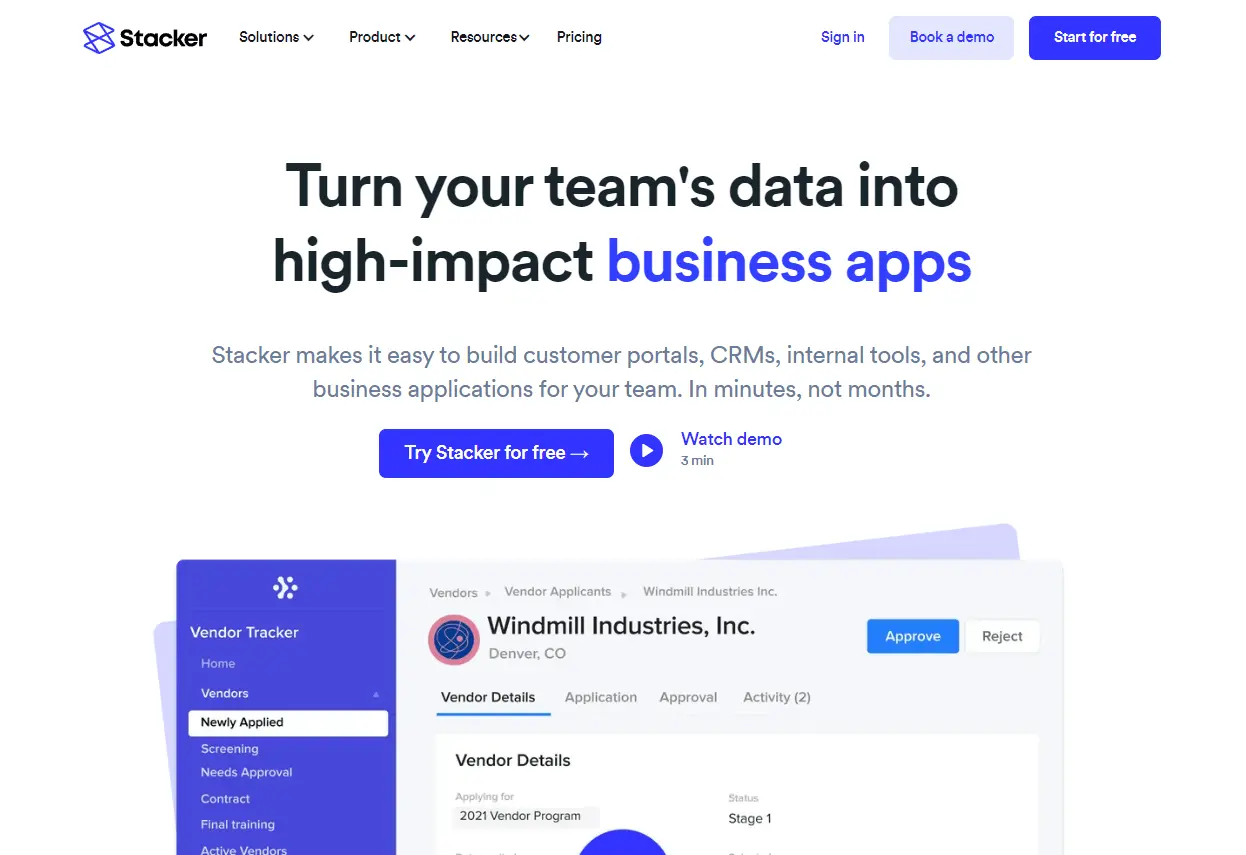
Stacker today stands out as an innovative solution for the rapid creation of customized applications without the need for in-depth coding skills. By combining the power of existing databases, notably Airtable, with an intuitive user interface, Stacker enables web developers and agencies to transform their data into functional, collaborative applications in record time.
In a world where demand for rapid prototyping and agile development continues to grow, how does Stacker really stack up against other no-code and low-code solutions? This article details its key features, benefits and limitations, to help you determine whether Stacker deserves a place in your toolbox in 2025.
My experience with Stacker
I've used Stacker mainly in a professional context to quickly build internal applications based on Airtable. What I appreciated first and foremost was the ease with which custom user interfaces can be created, which is a real plus point for team productivity and agility.
Stacker particularly excels when it comes to connecting and exploiting structured databases without necessarily writing code, making it suitable for both prototyping phases and light deployments. Its ability to manage roles and permissions finely is also highly beneficial in a collaborative setting.
However, it should be noted that Stacker shows its limitations when it comes to highly specific functionalities or complex integrations outside its native ecosystem. What's more, advanced customization can become limited as the project grows in complexity.
Is Stacker really useful for my needs?
The real question to ask yourself before choosing Stacker is: do I need to create a functional application without coding, starting from already structured data? For teams who want a fast, efficient tool for their Airtable databases, Stacker is the perfect answer.
Different profiles can benefit from Stacker: web agencies who need to deliver MVPs quickly for their clients, startups looking to prototype in-house solutions, or product managers who want to visualize data interactively without depending on developers for simple interfaces.
Its other strong point is advanced user access management, which is crucial in professional environments where data security and rights control are mandatory.

Is Stacker suitable for beginners?
Stacker is accessible enough for beginners who already have a simple database to exploit and want to create an application without coding. Its drag-and-drop interface and easy connection with Airtable make it a suitable solution for less technical users.
For a beginner, this means being able to quickly build a working prototype, test use cases and get professional rendering without going through a classic development phase, which is a real practical advantage.
How much does Stacker cost?
Stacker offers several packages to suit different needs. The basic plan starts at €99/month, offering essential features such as Airtable database management, simple interface creation and user access control. This plan is well suited to startups and small teams looking for an efficient no-code tool without high upfront costs.
For more advanced needs, Stacker offers more comprehensive plans including finer-grained permissions, additional integrations and priority support. These packages are aimed more at companies and agencies who want a robust tool for professional deployments with a good volume of users.
What are Stacker's key features?
The first key feature is the ability to transform an Airtable database into an interactive application, with customized interfaces accessible to different user profiles. This enables immediate, dynamic data exploitation without the need for traditional development.
Then, Stacker stands out for its advanced role and permissions management, which guarantees fine-grained control over who can see and modify what information - essential in professional environments with sensitive data.
Among its advanced features, Stacker offers the ability to create simple automations between data and user actions, making workflows run more smoothly without interruption.
Finally, the tool enables partial integration with other services via APIs and webhooks, opening the way to more comprehensive usage scenarios, although these features remain more limited compared to some competitors.
Stacker is not suited to every situation, particularly when uses require extensive customization, highly specific functionality or multiple, complex integrations with external APIs.
Competitors such as Bubble or Adalo offer greater flexibility on building highly customized applications, even if getting to grips with them can be more arduous. So you need to assess your needs carefully before taking the plunge.
At the end of the day, Stacker has clear advantages: simplicity of use, speed of deployment, and permissions management; but also drawbacks: limitations in advanced customization and dependence on supported databases mainly Airtable.
FAQS
Is it reliable and secure?
Stacker is designed with a high level of security, notably by using HTTPS protocols for all communications, ensuring the confidentiality of exchanged data. The roles and permissions management system also enables data access to be strictly limited according to user profiles, reinforcing security within teams.
The platform relies on robust, regularly updated cloud infrastructures, guaranteeing stable availability and protection against common vulnerabilities. In addition, Stacker benefits from compliance with current standards concerning the management of personal data, providing reassurance from a legal and IT point of view.
Is it compatible with my other tools?
Stacker is particularly compatible with Airtable, its main data foundation, but also offers integrations via APIs and webhooks to connect other tools. It supports common data formats to ensure simple import and export.
This compatibility makes it a flexible tool in a no code/low code ecosystem, easily integrating with existing workflows and extending its use to different types of projects.
Is there responsive customer support?
Stacker's customer support is renowned for its responsiveness and quality. Users can benefit from comprehensive documentation, online tutorials and support via chat or email.
Response times are generally fast, especially for paid plans where priority support is offered. This assistance is much appreciated, particularly in the deployment or technical problem-solving phases.
What do other users think?
User reviews mostly emphasize Stacker's ease of use and rapid implementation. On the other hand, some users deplore the limitations of more advanced integrations, and the increasing complexity when requirements go beyond the standard framework. This feedback is important to consider when assessing the suitability of the tool for one's own projects.
Can I easily change later?
User reviews mostly emphasize Stacker's ease of use and rapid implementation. On the other hand, some users deplore the limitations of more advanced integrations, and the increasing complexity when requirements go beyond the standard framework. This feedback is important to consider when assessing the suitability of the tool for one's own projects.
Alternatives
.svg)

Specializing in business creation, sales and digital marketing, he puts his expertise at the service of users to help them identify the solutions best suited to their needs. Passionate about digital innovation and optimizing online performance, Alexis is committed to providing detailed, transparent and unbiased comparisons.
Do you have an entrepreneurial project?
We support you in the structuring and development of your tech project. Make an appointment with one of our Business Strategists.