


.avif)





.svg)



Should Forest Admin be used in 2025?

Forest Admin is an essential tool for web developers and agencies wishing to rapidly deploy powerful, personalized administration interfaces. Its ability to integrate with existing databases and automate dashboard creation offers considerable time savings while guaranteeing rock-solid flexibility. With the increasing complexity of applications, having a tool that centralizes and facilitates data management is becoming almost indispensable.
But does Forest Admin really meet the expectations of demanding developers in 2025? In this article, we break down its features, strengths, limitations and suitability for your business projects, to help you make an informed choice.
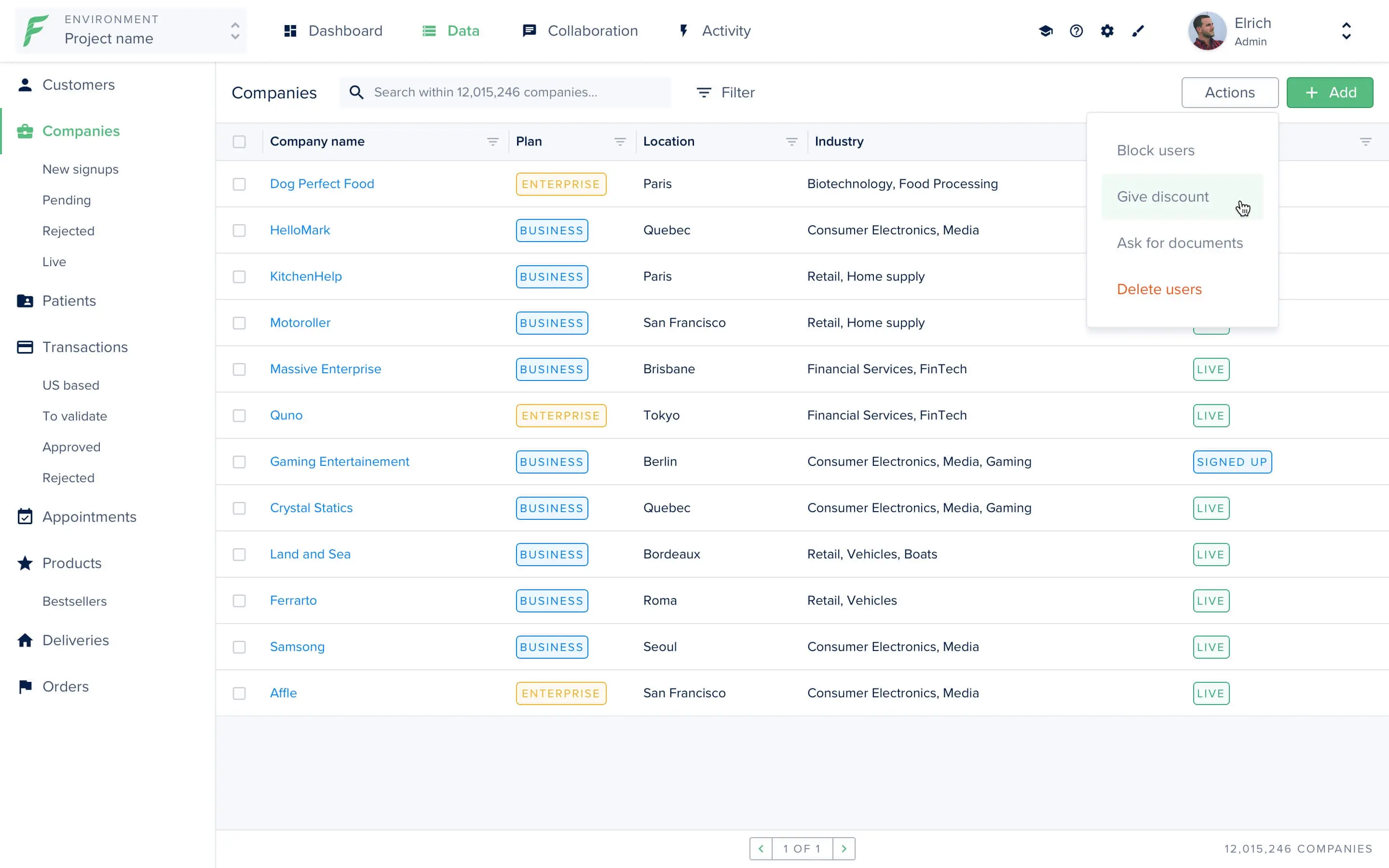
My experience with Forest Admin
I use Forest Admin both personally and professionally, particularly for managing complex databases and creating custom administration interfaces. What I particularly appreciate is its ability to quickly generate a functional dashboard while offering advanced customization thanks to its system of extensions. The flexibility of integration with different ORMs is a real asset in my projects.
In a professional context, Forest Admin excels at managing applications with large volumes and specific needs, such as complex filtering or user workflow. This makes it an excellent choice for web agencies working on SaaS solutions or customizable in-house platforms.
its limitations sometimes lie in the learning curve for beginners, particularly on advanced configuration, and in the cost, which can climb depending on the number of users or complexity of the desired functionalities. Despite this, the productivity offered more than makes up for these points.
Is Forest Admin really useful for my needs?
The real question to ask before adopting Forest Admin is whether you need a highly customizable administration tool capable of connecting to diverse databases and managing complex workflows. If your project goes beyond the basic CRUD table, Forest Admin deserves special consideration.
For a solo developer who wants a fast interface without too much customization, other simpler tools might suffice. On the other hand, for a web agency building specific administration panels for its clients, or for backend developers working on SaaS software with complex data structures, Forest Admin is an excellent choice. For example, a content management system, a logistics tracking tool or a complex CRM will benefit fully from Forest Admin's advanced functionalities and automations.
Another strong point is the ability to extend the tool with custom code, making the solution flexible in the face of the sometimes very specific needs encountered in business.

Is Forest Admin suitable for beginners?
Forest Admin is not the obvious first choice for a complete beginner, due to its rich functionality and sometimes complex configurations, such as database connection and advanced permissions management. However, developers with a moderate level can quickly get to grips with the basic functionalities.
The positive point for beginners is the clear documentation and examples provided, which make learning easy. What's more, the intuitive interface makes it quick to visualize and manipulate data once the initial configuration has been completed.
How much does Forest Admin cost?

Plan Starter at €59/month: This package includes the essential features for creating and managing a customized admin panel. Suitable for small start-up teams, it enables integration with a limited number of databases and users, and offers basic support.
Plan Business at €299/month: Designed for agencies or larger projects, this package offers an unlimited number of users, advanced customization via extensions and automations, priority support and enhanced security, notably with SSO options and fine-grained access management.
Each package offers a free trial period to test the tool before committing to it, which is highly recommended to validate its suitability for your specific requirements.
What are Forest Admin's key features?
Forest Admin's number one key feature is undoubtedly its ability to automatically generate a complete, customizable admin panel from your databases. Whether you're using PostgreSQL, MySQL, MongoDB or other solutions, the tool can retrieve schemas and create CRUD interfaces quickly, significantly speeding up development time.
Another major strength is customization via extensions and integrated business logic. You can create calculated fields, define validation rules, manage complex workflows, and fine-tune the user experience, making Forest Admin much more than just a basic dashboard generator.
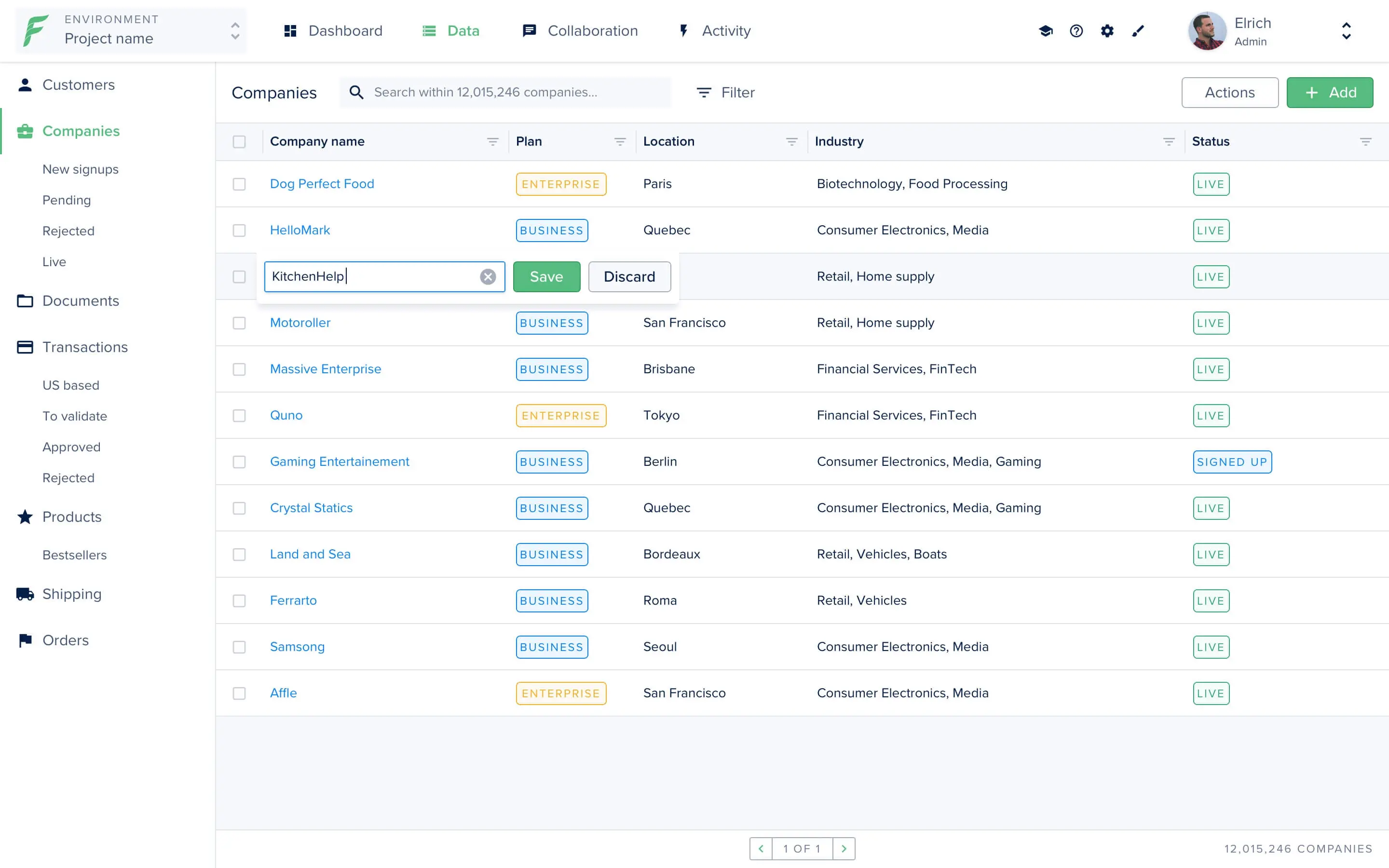
Advanced features also include native audit log integration and advanced roles and permissions management. Both aspects are essential for ensuring compliance and security in demanding business environments.
Furthermore, Forest Admin offers a comprehensive API and webhooks that make it easy to automate tasks and connect with other tools in your technical stack, ensuring a coherent and efficient ecosystem.
The limitations of Forest Admin often become apparent depending on the use case. For example, for a very simple project, the time investment for initial configuration may seem excessive. For small teams or freelancers who need a lightweight panel, its functional richness may seem over-dimensioned.
However, several competitors such as Retool, Supabase or Directus also offer administration solutions, sometimes quicker to set up or better suited to certain low-code contexts. Forest Admin, however, remains very robust and focused on advanced customization, which is its strength but also its complexity.
In summary, its advantages lie in power and flexibility, while its disadvantages are complexity for a beginner and the sometimes high cost. These elements need to be weighed up according to the nature and scope of the project.
FAQS
Is it reliable and secure?
Forest Admin is designed to be reliable and secure, with hosting that complies with data security standards, including RGPD and SOC 2. Communications between your infrastructure and Forest Admin are encrypted via TLS to guarantee the confidentiality and integrity of data passing through the platform.
Access management is based on a granular system of roles and permissions, combined with options such as Single Sign-On (SSO) and two-factor authentication, reinforcing user account security. Finally, the platform carries out regular audits and updates to maintain its robustness in the face of potential vulnerabilities.
Is it compatible with my other tools?
Forest Admin offers extensive compatibility with leading relational and NoSQL databases such as PostgreSQL, MySQL, MongoDB, SQL Server and many others. Its REST API and Webhooks make it easy to integrate the tool with third-party software or cloud services.
Furthermore, it supports popular ORM connection standards (Sequelize, TypeORM, Mongoose), making it easy to adopt in varied, modern technical stacks.
Is there responsive customer support?
Forest Admin customer support is renowned for its responsiveness and expertise. Users benefit from a support service accessible via email and chat in paid plans, with rapid response times, often in less than 24 hours on weekdays.
For Business plans, priority support is offered, ensuring personalized guidance and expert advice to optimize the use of the tool in complex environments.
What do other users think?
Forest Admin user reviews often highlight ease of deployment and powerful customization as key strengths. Many appreciate the quality of the user interface and the ability to handle complex use cases.
Criticisms focus mainly on the price, which may seem high for some small structures, as well as a certain initial complexity that may put off complete beginners. Nonetheless, the majority agree that the rise in competence is worth the investment.
Can I easily change later?
Forest Admin user reviews often highlight ease of deployment and powerful customization as key strengths. Many appreciate the quality of the user interface and the ability to handle complex use cases.
Criticisms focus mainly on the price, which may seem high for some small structures, as well as a certain initial complexity that may put off complete beginners. Nonetheless, the majority agree that the rise in competence is worth the investment.
Alternatives
.svg)

Specializing in business creation, sales and digital marketing, he puts his expertise at the service of users to help them identify the solutions best suited to their needs. Passionate about digital innovation and optimizing online performance, Alexis is committed to providing detailed, transparent and unbiased comparisons.
Do you have an entrepreneurial project?
We support you in the structuring and development of your tech project. Make an appointment with one of our Business Strategists.