


.avif)





.svg)
.svg)



.svg)

Figma has established itself as the star tool, the gold standard for collaborative design. It has literally transformed the way we design and prototype interfaces, becoming an essential industry standard in just a few years. But in 2025, with the acceleration of technologies and the emergence of new platforms, is it still the most relevant choice for your visual creations? Its strengths, its limitations, its real effectiveness in the field... After years of intensive use at Easy Web, I offer you my complete feedback and objective opinion to help you see clearly.
My experience with Figma
I've been using Figma for several years now at Easy Web, and it has become an essential part of our daily work. What has always impressed me and what I consider to be its undeniable strength is its real-time collaboration feature.
This aspect makes it perfect for agencies and distributed teams. Simultaneous co-editing, integrated comments, and automatic versions greatly accelerate design cycles and client validation, transforming the workflow into a fluid dance.
However, even though it's our flagship product, Figma has its limitations. For advanced image processing or very specific vector illustrations, it remains less specialized than some of the big players. Furthermore, its dependence on a stable internet connection is a non-negotiable prerequisite.
Is Figma really useful for my needs?
The real question to ask yourself before using Figma is: what is my goal? Its relevance depends greatly on how you use it. For designing user interfaces, websites, or applications, it's the ultimate tool. If your goal is to create a seamless experience, Figma is a must-have.
Whether you're a UX/UI designer, part of a product team, or running an agency, Figma boosts your efficiency tenfold. Imagine collaborating live on mockups with a client or iterating on a complex prototype. At Easy Web, we've embraced this real-time fluidity, simplifying our processes.
Its other major advantage? Design system management. Centralizing your components and styles ensures perfect consistency across every project. It provides a solid foundation for rapid development and maintaining impeccable quality.
Is Figma suitable for beginners?
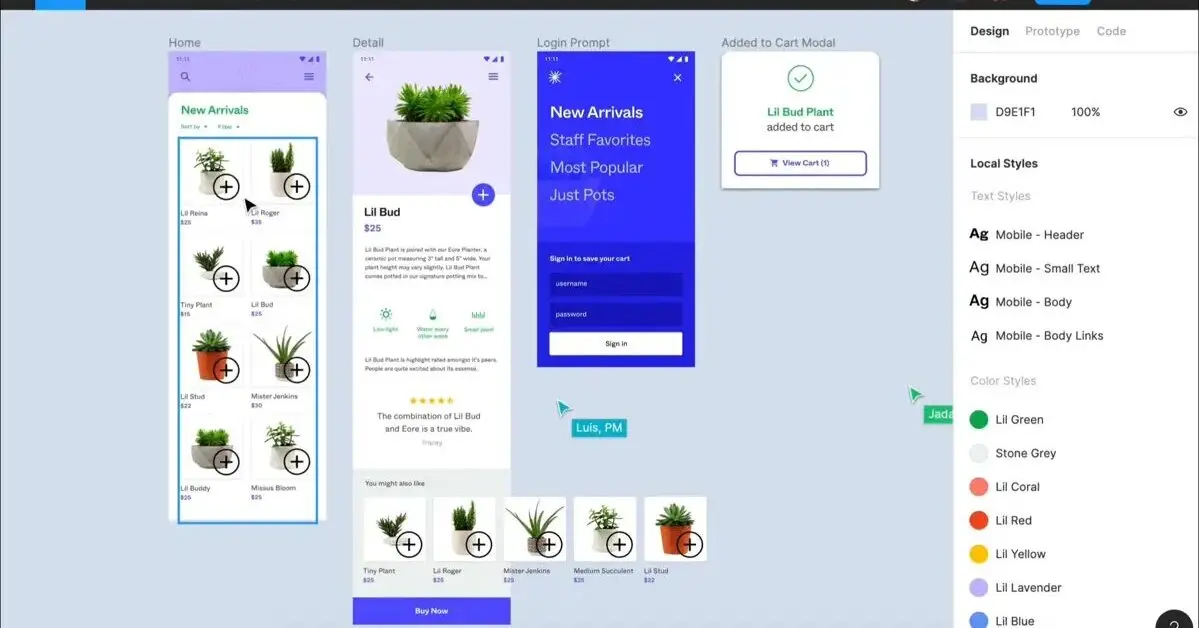
You often wonder what tool to recommend to a novice designer, don't you? For me, Figma is the obvious choice. Its intuitive interface is a blessing: a newcomer can quickly find their feet with features such as drag-and-drop, text tools, and simple shape creation. We see designers creating their first interactive wireframes or even small app mockups in a matter of hours, without getting lost in complex menus. It's the perfect tool for getting started in UI/UX without frustration.
Figma's accessibility is its major advantage for beginners. There's no need to install heavy software—everything is in the browser. The free version is more than enough to get started, allowing you to experiment and prototype without any initial cost. I would add that the huge community and wealth of online tutorials make learning much easier. It's an ideal springboard for learning the basics of digital design.


How much does Figma cost?
So, let's talk about budget, a crucial point at Easy Web. Figma offers very distinct plans. The Starter plan (free) is perfect for getting started or for your personal projects. It's an excellent entry point, but for serious production, its limitations will quickly become apparent.
The Professional plan, at $12 per user/month (billed annually), is our preferred choice for freelancers and small teams. It unlocks unlimited collaboration, version history, and advanced prototyping—essential features.
For large agencies or established teams, the Organization plan ($45 per user/month, annual) is tailor-made. It centralizes the management of libraries and fonts, which is crucial for consistency. Finally,the Enterprise plan is available on request for very large organizations with specific security and integration needs. Tailor your choice to your actual needs!
What are the key features of Figma?
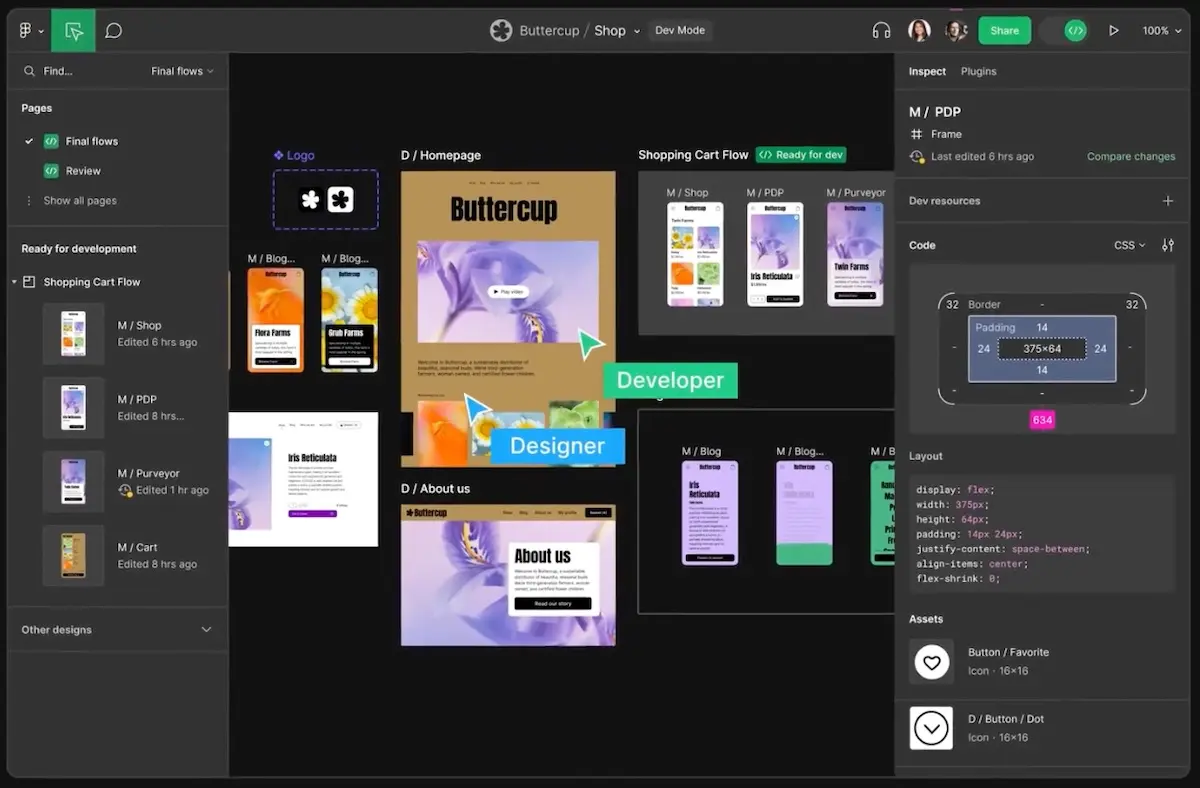
The first thing that impressed me about Figma was its ability to transform collaboration. No more back-and-forth file exchanges and outdated versions! At Easy Web, our designers can work on the same file in real time, see our clients' comments appear instantly, and even our developers can inspect the code directly. This fluidity has radically changed the way we work, reducing approval time and boosting our team's efficiency like never before.
Secondly, Figma's prototyping tool is incredibly powerful and disarmingly simple. With just a few clicks, you can go from a static mockup to an interactive user journey, complete with smooth transitions and animations. This allows us to bring our ideas to life, test our concepts with real users early on, and get tangible feedback before even writing a single line of code. It's a major asset for validating experiences and ensuring we're on the right track.
When it comes to pure efficiency, Variables in Figma have become a cornerstone at Easy Web. No more tedious management of design variations: colors, spacing, and border radii are defined as dynamic variables. This is a revolution for the scalability of our design systems, allowing us to switch between light and dark modes in the blink of an eye or adapt a component to different brands. Consistency and production speed? Multiplied.
And I have to tell you about Advanced Prototyping and Interactive Components. We no longer make simple clickable mockups; we simulate ultra-realistic user experiences. Thanks to Smart Animate and complex interactions, our clients see and test interfaces that move, respond, and come to life. No more long speeches—we show them the flow in concrete terms. For developers, it's living documentation, reducing back-and-forth communication and misunderstandings. It's a real game-changer for validation.
Honestly, even though I rely heavily on Figma on a daily basis, it has its limitations. If you work on advanced photo editing, video editing, or highly complex layouts for offset printing, Figma is not your best ally. Its cloud-based nature can also be problematic on unstable connections or for large files.
For these specific scenarios, I always keep Adobe Photoshop or Illustrator handy. This is where tools like Sketch or Adobe XD can also come into their own in certain areas. But make no mistake: these few shortcomings are minor compared to Figma's incredible efficiency for UI/UX design.
Advantages:
- Unmatched real-time collaboration
- Rapid and intuitive prototyping
- Powerful component system and variants
Disadvantages:
- Dependence on a stable internet connection
- Less efficient for processing large bitmap images
- Limited print features
FAQ
Is it reliable and secure?
Definitely, yes. Its cloud infrastructure guarantees exemplary reliability: constant access and automatic backups, which is a real relief. We use it every day and outages are virtually non-existent.
In terms of security, it's rock solid. Your data is encrypted end-to-end (TLS/SSL in transit, AES-256 at rest) and multi-factor authentication is supported. More importantly, Figma is fully GDPR compliant and SOC 2 certified. These standards are essential and demonstrate a serious commitment to protecting your projects and sensitive information. For me, that's a foundation of trust.
Is it compatible with my other tools?
Absolutely, it's even a cornerstone of its success in 2025! Figma is designed for seamless integration. Whether through plugins for project management tools like Jira or communication platforms like Slack, or for handoffs to developers with Zeplin or Storybook. Its open APIs even allow you to build custom bridges. For us at Easy Web, this ability to talk to everything else is crucial. It makes our workflows agile and ultra-efficient.
Is there responsive customer support?
Honestly? Figma's direct customer support is more like a marathon than a sprint. Got an urgent issue with a client project? Don't count on an immediate response. Their strength lies mainly in their comprehensive online documentation and hyperactive community. For specific questions, the forum or specialized groups are often quicker. At Easy Web, we've learned to rely on these resources before contacting official support, which can take several days to respond. That's the downside of such a massive tool.
What do other users think?
The design community is unanimous: Figma is highly acclaimed. What stands out the most? Its real-time collaboration capabilities, a game-changer for teams like ours at Easy Web. Users also highlight its accessibility via browser and the power of its design systems—components, variants, auto-layout—which greatly streamline workflows. Clearly, its rich ecosystem and flexibility make it the go-to tool for many.
Can I easily change later?
Yes, without a doubt. It's even one of its greatest strengths. Figma is built for rapid iteration and flexibility. Thanks to components and their variants, you can centralize your design elements. Changing a color or property on a master component instantly updates all its instances. The same goes for text and color styles.Auto Layout adapts to your content changes, avoiding manual redesigns. Having implemented it at Easy Web, I can say that it's a major asset for the maintainability of your designs, even on projects that are constantly evolving.
Alternatives
.avif)
Specializing in business creation, sales and digital marketing, he puts his expertise at the service of users to help them identify the solutions best suited to their needs. Passionate about digital innovation and online performance optimization, Alexis is committed to providing detailed, transparent and unbiased comparisons.
Do you have an entrepreneurial project?
We support you in structuring and developing your tech project. Make an appointment with one of our Business Strategists.